

Home health agencies are walking into 2026 with thinner margins and less room for error. CMS finalized a net aggregate Medicare payment reduction for the year, Medicare Advantage authorization rules keep multiplying, OASIS-E2 took effect April 1, and a single late NOA or missed visit threshold can quietly erase a chunk of an episode’s reimbursement. When payment tightens, the agencies that protect cash flow are the ones that treat revenue cycle management as a clinical-financial operating system, not a back-office billing chore.
Home health revenue cycle management is the end-to-end process of managing an agency’s financial lifecycle from referral and eligibility verification through OASIS documentation, coding, claim submission, payment posting, and denial resolution. In home health, RCM connects clinical documentation, PDGM rules, NOA timing, and payer requirements to reimbursement accuracy and cash flow.
This guide walks through what home health RCM actually involves, why it matters more in 2026, the seven stages from intake to paid claim, the KPIs worth tracking, where revenue leaks, and how to decide between in-house, outsourced, and integrated models. It is written for agency owners, administrators, billing managers, CFOs, and clinical leaders who want fewer denials, faster collections, and a revenue cycle that holds up under audit.
Is your agency losing revenue before claims even go out?
If AR days are rising, denials keep repeating, or OASIS, NOA, or LUPA issues are slowing payment, find the bottleneck before it reaches your cash flow.
Home Health RCM at a Glance
- What it means: The full financial lifecycle of a home health episode, from referral and eligibility through OASIS, coding, claims, payment, and denial follow-up.
- Why it matters in 2026: CMS finalized a net aggregate payment cut, OASIS-E2 changed documentation, and Medicare Advantage adds authorization friction, so preventable leakage costs more.
- Biggest revenue risks: Late NOAs, missed LUPA thresholds, OASIS/coding mismatches, missing F2F or signed orders, authorization gaps, and aging A/R.
- Most important KPIs: Clean claim rate, first-pass yield, denial rate, days in A/R, A/R over 90 days, net collection rate, NOA timeliness, and LUPA rate.
- Best next step: Baseline your KPIs by payer, find your biggest workflow leak, and tighten controls from intake to paid claim.
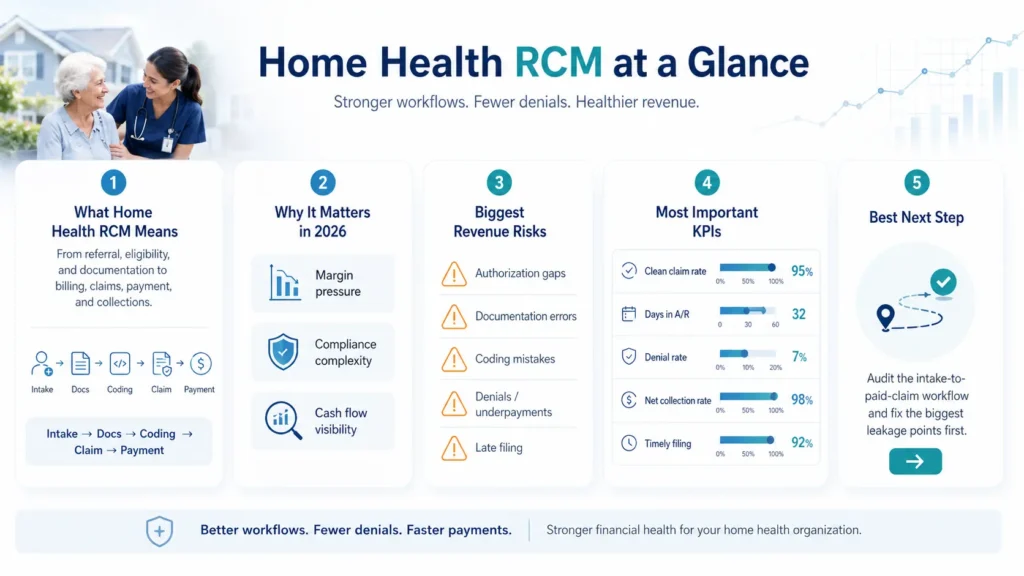
Table of Contents
What Is Home Health Revenue Cycle Management?
Home health revenue cycle management is the financial and operational process that carries a patient episode from referral all the way to final payment. It folds in eligibility verification, prior authorization, Face-to-Face documentation, Notice of Admission submission, OASIS assessment, clinical documentation, coding, claim submission, payment posting, denial management, and accounts receivable follow-up. Every one of those steps either protects reimbursement or puts it at risk.
The mistake many agencies make is treating RCM as a synonym for billing. It is not. RCM is the connection point between clinical operations and revenue protection. A late OASIS, a missing physician signature, a delayed NOA, an authorization gap, or a coding error does not just create paperwork. It directly moves your AR days, denial rate, clean claim rate, and cash flow predictability. If you want to outsource or modernize, your home health billing services partner should understand that link, not just push claims out the door.
Here is the workflow in plain terms:
- Referral and intake. The patient referral is captured, payer details are collected, and required documentation begins.
- Eligibility and authorization. Coverage, benefits, payer rules, and prior authorization requirements are verified.
- NOA and start-of-care documentation. The agency manages admission timing, NOA submission, and required start-of-care documentation.
- OASIS, coding, and PDGM grouping. Clinical documentation and OASIS data support coding, case-mix accuracy, and reimbursement.
- Claim submission and payment posting. Clean claims go out, payer responses are tracked, and payments are posted.
- Denial management and AR follow-up. Rejections, denials, underpayments, and aging balances are investigated and resolved.
How Home Health RCM Differs From Hospital or Clinic RCM
Hospital and clinic billing largely revolves around discrete encounters and fee-for-service charges. Home health does not work that way. Care is field-based and episodic, paid under the Patient-Driven Groupings Model (PDGM) in 30-day periods. OASIS documentation and ICD-10 coding carry real financial weight because they drive case-mix. NOA timing, Face-to-Face documentation, and physician signatures can determine whether a claim is paid at all. And the Low Utilization Payment Adjustment (LUPA) means a couple of missed visits can convert an expected episode payment into a per-visit payment.
That is why home health teams struggle with problems hospital billers rarely see: claims denied despite “complete” documentation, high AR days even when claims went out on time, confusion about how OASIS feeds payment, authorizations scattered across multiple payers, missing F2F signatures, delayed clinical notes that bottleneck billing, and almost no visibility between what the clinician documented and what the payer actually paid. Connecting those two worlds is exactly what a strong home health EMR and revenue cycle workflow is supposed to do.
Quick Diagnostic: Where Is Your Home Health Revenue Cycle Breaking Down?
Before diving into the full workflow, use this quick map to point yourself toward the right fix. Most revenue problems trace back to a specific upstream gap, not a vague “billing issue.”
| Symptom | Likely Root Cause | Best Next Step |
| AR days rising | Denial follow-up gaps, payer delays, slow posting | Request an AR review |
| A/R over 90 growing | Unworked denials, no aged-claim ownership | Build payer-specific AR queues |
| Clean claim rate falling | Intake, coding, authorization, or scrubber gaps | Run a claim readiness audit |
| NOA penalties appearing | SOC-to-NOA timing breakdown | Review the NOA workflow |
| LUPA spike | Missed visits, weak utilization tracking | Review visit utilization |
| Case-mix decline | OASIS/coding mismatch or downcoding | Request an OASIS/coding review |
| Unbilled visits growing | Documentation delays | Review the EMR workflow |
| Medicare Advantage claims aging | Authorization and payer-rule gaps | Build payer-specific auth tracking |
| Repeating denials | Reworking claims instead of fixing the source | Run denial root-cause analysis |
| Missing orders delaying final claims | No order/F2F tracking before billing | Add a pre-bill hard stop |
Find your biggest revenue cycle bottleneck
We will review recent claims, compare expected against actual reimbursement, and pinpoint whether your leaks are coming from intake, authorization, OASIS, NOA timing, LUPAs, denials, or aging A/R.
Request a Free Home Health Billing AuditWhy Home Health Revenue Cycle Management Matters More in 2026
In 2026, home health RCM is a margin-protection and compliance-readiness function, not a clerical task. Several pressures are landing at once, and each one raises the cost of an upstream documentation, authorization, coding, or timing mistake.
Start with the money. On November 28, 2025, CMS issued the CY 2026 Home Health Prospective Payment System Final Rule (CMS-1828-F). CMS estimates that Medicare payments to home health agencies in 2026 will decrease by roughly 1.3% in the aggregate, about $220 million, compared to 2025. That figure combines a positive payment update with offsetting adjustments: the rule finalizes a permanent prospective adjustment of -1.023% and a one-year temporary adjustment of -3.0% to the 2026 payment rate. The practical takeaway is simple. 2026 is not a year to make it up on volume. It is a year to protect reimbursement before, during, and after care.
The rule does more than cut. CMS finalized recalibrated PDGM case-mix weights, updated LUPA thresholds, updated functional impairment levels, and comorbidity adjustment subgroups for 2026, all built using 2024 home health claims linked with OASIS data. When weights and thresholds shift, accurate OASIS, consistent documentation, and clean clinical grouping matter even more for reimbursement and audit defense.
OASIS-E2 raises the stakes again. Effective April 1, 2026, it changes documentation workflows and item-level requirements. OASIS-E2 readiness is a revenue-cycle issue, not just a clinical project. If OASIS responses, diagnoses, and coding do not align, agencies can face underpayment, denials, or audit exposure. Under PDGM, payment depends heavily on accurate clinical grouping, functional impairment capture, comorbidity documentation, and case-mix assignment, which makes clinical documentation and RCM inseparable.
The Home Health Value-Based Purchasing (HHVBP) Expanded Model adds another layer, tying quality performance to payment movement. Medicare Advantage keeps growing as a share of home health volume, which can increase prior authorizations, payer-specific documentation rules, medical necessity standards, and slower payment cycles. NOA penalties remain a direct margin hit. And staffing turnover increases reliance on repeatable workflows, because when a key biller or coder leaves, missed NOAs, incomplete documentation, authorization errors, and slow denial follow-up tend to follow. This is a large part of why an integrated EMR and RCM workflow matters more in a tighter year: it standardizes the handoffs that turnover usually breaks.
| 2026 Pressure | RCM Risk | What Agencies Need |
| Net aggregate payment reduction | Less room for billing mistakes | Cleaner claims and faster denial resolution |
| OASIS-E2 implementation | More documentation complexity | OASIS, diagnosis, and coding alignment |
| PDGM case-mix recalibration | Underpayment or audit exposure | Clinical-financial documentation review |
| Medicare Advantage growth | More prior auth, slower payments | Payer-specific authorization workflows |
| NOA penalties | Direct payment reductions | Real-time NOA alerts and admission tracking |
| LUPA thresholds | Missed visits reduce payment | Visit tracking and utilization alerts |
| Staffing turnover | Repeat errors and knowledge gaps | Standardized EMR and RCM workflows |
For the full text of the rule, see the CMS CY 2026 Home Health PPS Final Rule fact sheet. For OASIS-E2 specifics, review the CMS OASIS-E2 guidance manual. The bottom line for 2026: strong RCM is about protecting reimbursement before the claim is ever created.
How This Guide Was Built
This guide was built from CMS Home Health Prospective Payment System guidance, the CY 2026 HH PPS Final Rule (CMS-1828-F), OASIS-E2 documentation requirements, eCFR Part 484, CMS Notice of Admission guidance, and real intake-to-paid-claim operating experience, combined with common home health denial, AR aging, and revenue-leak patterns. Regulatory figures were verified against official CMS sources. Benchmark ranges vary by payer mix, agency size, and contract terms, so they are presented as internal targets rather than universal rules.
Last updated: June 2026. Reviewed for: home health RCM, billing workflow, OASIS/PDGM, NOA/LUPA, and denial prevention. This article is educational and does not replace payer-specific billing instructions, legal advice, or compliance advice.
The 7 Stages of Home Health Revenue Cycle Management: Intake to Paid Claim
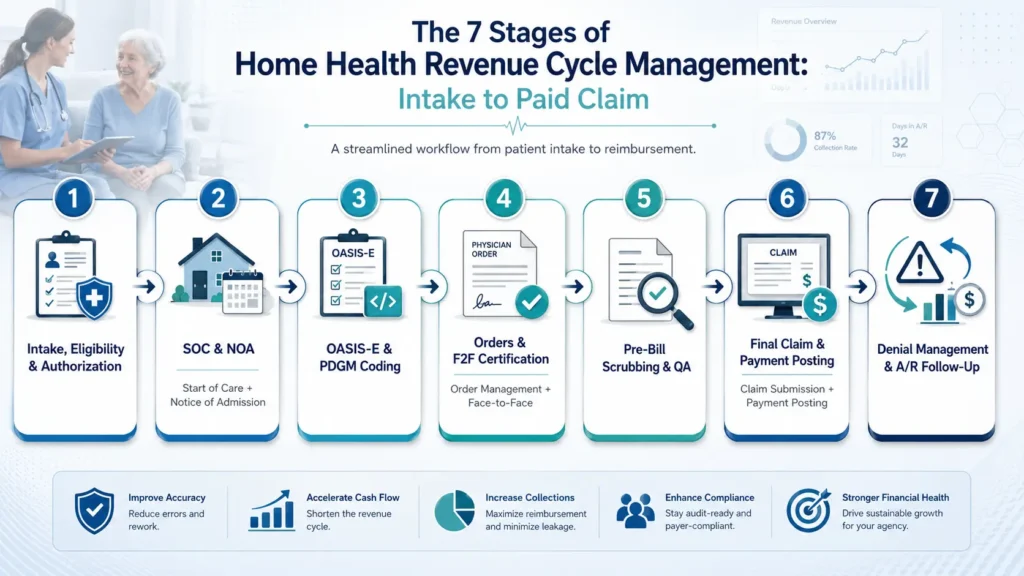
Home health billing is not a fee-for-service flow where everything happens after the visit. It is a 30-day episodic pipeline where clinical work and financial work run at the same time. A late OASIS or an unsigned order can stall the entire payment process, and “charge capture” depends on PDGM grouping, OASIS data, HIPPS accuracy, visit thresholds, documentation support, and payer authorization rules. Here is how a claim moves from referral to payment, and where revenue leaks at each step.
Stage 1: Intake, Eligibility Verification, and Authorization
The cycle starts when the referral arrives. The agency registers the patient, collects demographics, verifies payer information, confirms Medicare versus Medicare Advantage status, checks network and benefit details, and identifies prior authorization requirements. This is front-end revenue protection. Incomplete demographics, the wrong payer, an unverified Medicare Advantage plan, missing PECOS/NPI checks, or starting visits before authorization is approved all create downstream denials. What high-performing agencies do: mandatory intake fields, real-time eligibility at referral and again before the first visit, clear separation of Traditional Medicare and Medicare Advantage, and authorization tracking by visit count, discipline, date range, and expiration, not just date range. KPI to track: eligibility verification completion rate and authorization lag time.
Stage 2: Start of Care (SOC) and Notice of Admission (NOA)
The patient begins care, the first billable visit is completed, and the agency confirms an order supports the initial skilled service before submitting the NOA. This step is governed by a hard deadline: the NOA must be submitted to the Medicare contractor within 5 calendar days of the start of care to establish the home health period and trigger consolidated billing edits. Miss it, and the math is unforgiving. A late NOA reduces payment for the period of care, including outlier payments, by 1/30th of the wage-adjusted period payment for each day from the start of care until the NOA is submitted and accepted, and that reduction is a provider liability you cannot bill to the beneficiary. The most common self-inflicted wound here is waiting for the full OASIS to lock before submitting. You do not need to. The NOA can go out once the order for the initial visit is documented and the first billable visit is complete. What high-performing agencies do: submit the NOA right after the first billable visit and required order are secured, build day-1 and day-2 alerts, and track NOA acceptance, not just submission. KPI to track: NOA timeliness and NOA acceptance rate.
Stage 3: OASIS-E Assessment and PDGM Coding
Clinicians complete the OASIS assessment, coders assign ICD-10 codes, and QA validates that OASIS responses, diagnosis coding, functional impairment, comorbidities, and PDGM grouping all tell the same story before the claim is created. Under PDGM, patients are classified into one of 432 case-mix groups based on clinical condition, admission source, episode timing, functional impairment level, and comorbidity adjustment. When the OASIS understates functional impairment or a comorbidity goes uncaptured, the agency can be underpaid without ever seeing a denial. What high-performing agencies do: complete OASIS close to the SOC visit, require QA review before claim creation, validate the primary diagnosis and comorbidity capture, use certified coders, and treat AI-assisted coding as a draft that still needs human review. KPI to track: OASIS accuracy rate and case-mix accuracy.
Stage 4: Order Management and Face-to-Face (F2F) Certification
The agency obtains and tracks signed physician orders, the CMS-485 plan of care, Face-to-Face documentation, homebound support, and skilled-need justification, all of which defend the claim during ADR or audit. The 2026 final rule actually widened who can perform the F2F: any allowed practitioner (physician, NP, PA, CNS, or CNM) may now perform it, regardless of whether they are the certifying practitioner. That flexibility can reduce signature bottlenecks, but it does not remove the requirement that the documentation exist and be complete before final billing. What high-performing agencies do: assign a clear owner for order management, use an EMR order-tracking dashboard with physician-portal reminders, and put a hard stop before final billing when the plan of care, F2F, or skilled-need support is missing. KPI to track: F2F completion rate and order signature turnaround.
Stage 5: Pre-Bill Scrubbing and QA Review
Before the final claim goes out, the agency reviews demographics, eligibility, authorization, OASIS, coding, HIPPS, signatures, visit notes, LUPA thresholds, payer-specific edits, and claim formatting. This is the last line of defense, and clearinghouse edits alone will not catch everything. A clearinghouse will flag a missing field. It will not tell you the OASIS understated acuity or that the period is sitting one visit below the LUPA threshold. What high-performing agencies do: run a home-health-specific claim scrubber, re-verify eligibility, check LUPA exposure, and hold claims that are one or two visits short of the threshold for scheduling review. KPI to track: clean claim rate and pre-bill QA pass rate.
Stage 6: Final Claim Submission and Payment Posting
After services and documentation are complete and the NOA is accepted, the agency submits the final claim (TOB 329), receives the electronic remittance advice (835/ERA), posts payments and adjustments, and reconciles expected against actual reimbursement. The big risks here are submitting before NOA acceptance, lumping Medicare Advantage payments into standard Medicare buckets, and never checking expected versus actual. What high-performing agencies do: verify NOA acceptance first, automate ERA posting, separate payer buckets, and track payment variance. KPI to track: days to bill claims and net collection rate.
Stage 7: Denial Management and A/R Follow-Up
The agency works aging receivables, investigates denials, categorizes root causes, files appeals and reopenings inside deadlines, and feeds insights back into intake, authorization, documentation, and QA. The failure mode is working denials chronologically instead of by dollar value and deadline, and reworking claims without fixing the upstream cause. What high-performing agencies do: post payments daily, segment AR by payer and age, prioritize by value and appeal deadline, and categorize every denial by root cause so the pattern gets fixed once, not monthly. KPI to track: AR days by payer and denial rate.
| Stage | Revenue Risk | Best-Practice Control | KPI to Track |
| Intake, eligibility, authorization | Wrong payer, missing auth, bad demographics | Mandatory intake fields + real-time eligibility and auth tracking | Eligibility completion rate; auth compliance rate |
| SOC and NOA | Late or rejected NOA | Day-1/day-2 NOA submission alerts | NOA timeliness; NOA acceptance rate |
| OASIS and PDGM coding | Underpayment, denial, HIPPS mismatch | QA review of OASIS, coding, and documentation | OASIS accuracy; coding denial rate |
| Orders and F2F | Final claim held or audit risk | Order dashboard + physician reminder workflow | Signature turnaround; F2F completion rate |
| Pre-bill QA | Rejections, LUPA misses, missing docs | Claim scrubber + hold-for-review queue | Clean claim rate; pre-bill pass rate |
| Final claim and payment posting | Claim return, misposting, payment variance | NOA acceptance check + ERA auto-posting | Days to bill; posting turnaround |
| Denials and A/R | Aging AR and permanent revenue loss | Root-cause denial queues + deadline tracking | AR days; denial resolution time |
Home Health RCM KPIs Every Agency Should Track
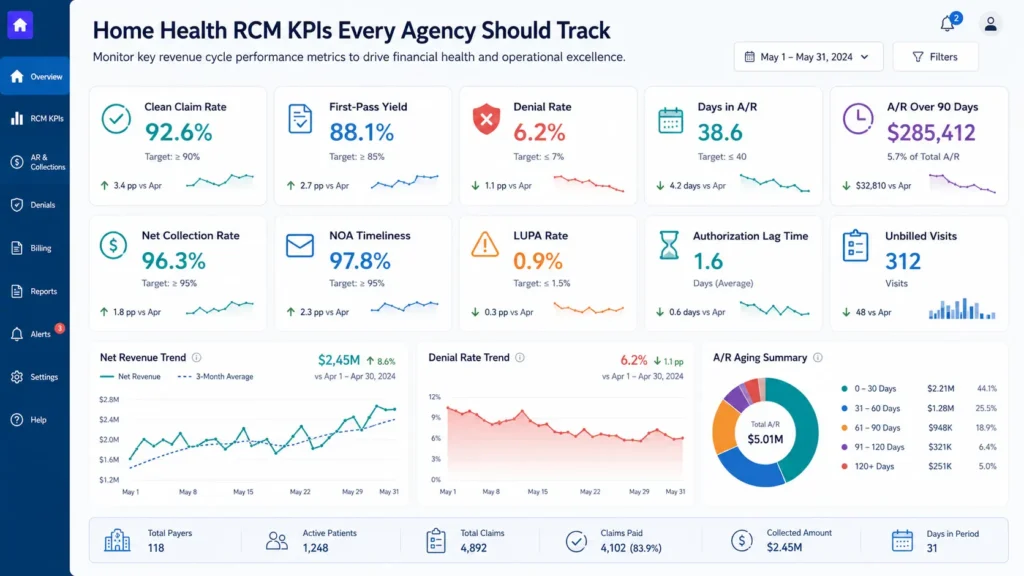
Home health agencies do not need dozens of billing metrics. They need a small dashboard of five to eight KPIs that connect front-end workflow quality, things like intake, authorization, OASIS, NOA, F2F, and coding, to back-end outcomes like cash flow, AR days, denial rate, and net collection. The point of a tight KPI set is that it acts as an early-warning system. In home health, a clinical or intake error often does not show up financially until 60 to 90 days later, so a declining clean claim rate or a rising authorization lag is your chance to fix the leak before it becomes a cash crisis.
Clean claim rate measures whether a claim was accepted on first submission without edits or rejections. First-pass yield measures whether it was actually paid without rework. A claim can be technically clean and still get denied later for prior authorization, medical necessity, F2F documentation, or an OASIS-diagnosis mismatch, which is why first-pass yield is often the more honest revenue-capture metric.
| KPI | What It Measures | Formula | Why It Matters | Warning Sign |
| Clean Claim Rate | Claims accepted on first submission without edits | Claims accepted first pass / total claims submitted x 100 | Shows whether claims leave the agency clean | A sustained drop below your baseline |
| First-Pass Yield | Claims paid without rework after first submission | Claims paid without rework / total claims submitted x 100 | Reflects real revenue capture better than CCR | A large gap between CCR and FPY |
| Denial Rate | Share of claims denied by payers | Denied claims / total claims submitted x 100 | Denials delay cash and may become permanent loss | Same reason codes recurring monthly |
| Days in A/R | Average time to collect after billing | Total A/R / average daily net patient revenue | Measures cash-flow velocity | A rising trend, especially within one payer |
| A/R Over 90 Days | Share of receivables older than 90 days | A/R 90+ days / total A/R x 100 | Older claims are harder to collect | A growing 90+ bucket |
| Net Collection Rate | Expected reimbursement actually collected | Collections / (charges – contractual adjustments) x 100 | Shows if you collect what you should | A decline pointing to underpayments |
| NOA Timeliness | NOAs submitted within the 5-day window | On-time NOAs / total NOAs required x 100 | Late NOAs create direct payment penalties | Anything below 100% |
| LUPA Rate | Periods paid per-visit instead of episodic | LUPA episodes / total 30-day periods x 100 | Flags missed visits and revenue leakage | A rising trend by branch or payer |
| Authorization Lag Time | Average days from auth request to approval | Average days from request to confirmation | Leading indicator for MA and MCO denials | Delays beyond payer norms |
| Unbilled Visits | Completed visits not yet billed | Unbilled visits / total completed visits x 100 | Earned revenue stuck outside the pipeline | A rising aged-unbilled backlog |
The most important habit is segmentation. A blended Days in A/R number can look healthy while Medicare Advantage claims age, a Medicaid MCO delays authorizations, or one branch drives most of your denials. Review every metric by payer, branch, clinician, and denial reason so you fix root causes instead of chasing symptoms. Benchmarks vary by payer mix, contract terms, agency size, and service line, so treat any published range as an internal threshold rather than a universal rule.
Benchmark your home health RCM metrics
If your Days in A/R are creeping past your baseline, your clean claim rate is slipping, or your A/R over 90 keeps growing, get a payer-level read on where cash is getting stuck.
Get a Free Revenue Cycle AssessmentCommon Revenue Leaks in Home Health Agencies
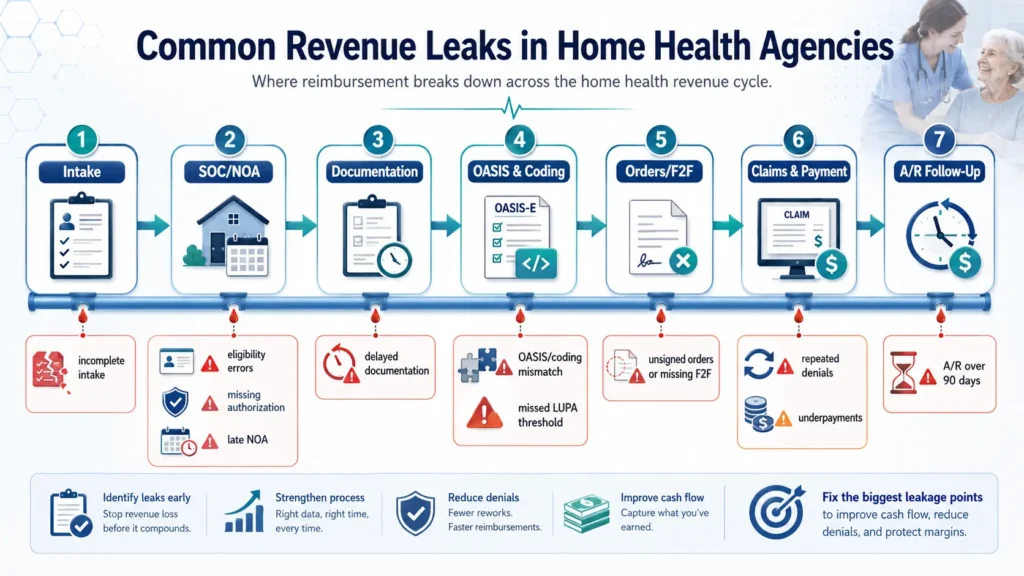
Most home health revenue does not disappear in one obvious place. It leaks through small operational gaps that compound across the cycle. A referral missing insurance details becomes an eligibility denial. A late visit note becomes an unbilled visit. A mismatched OASIS lowers the case-mix weight. A late NOA becomes a direct payment reduction. An unworked denial becomes aged AR and eventually a write-off. The principle to remember: home health revenue leakage is usually a workflow problem before it becomes a billing problem.
| Revenue Leak | Root Cause | Warning Sign | Revenue Impact | Fix | KPI Affected |
| Incomplete intake | Missing demographics, insurance, or physician data | Repeated eligibility failures, duplicate records | Downstream denials and rework | Mandatory intake fields, real-time validation | Clean claim rate; denial rate |
| Eligibility errors | Coverage or payer type not verified before care | Denials for ineligible or wrong-payer claims | Delayed or prevented reimbursement | Verify at referral and before first visit | Denial rate; AR days |
| Missing authorization | Visits begin without auth or exceed limits | Auth-related denials, visits outside limits | Services become non-billable | Auth tracking by visit count and expiration | Auth lag time; first-pass yield |
| Late NOA | Staff wait for full OASIS to lock | NOA submitted day 6+, compliance under 100% | Direct 1/30th-per-day payment reduction | Decouple NOA from OASIS; day-1/day-2 alerts | NOA timeliness; clean claim rate |
| Returned NOA / identifier errors | Incorrect MBI or identifier mismatch | NOA returned; claim cannot match | Added delay and late-filing risk | Verify MBI before admission; track corrections | NOA acceptance rate; AR days |
| Delayed documentation | Visit notes not completed on time | Documentation backlog by clinician | Earned revenue stuck before billing | Point-of-care completion; daily escalation | Unbilled visits; days to bill |
| Unbilled visits | Completed visits not moved to billing | Growing unbilled backlog by age | Earned but unbilled revenue | Daily unbilled reports, owned work queues | Unbilled visits; AR days |
| OASIS/coding mismatch | Codes not supported by OASIS or notes | Coding denials, case-mix decline | Underpayment or recoupment risk | QA review and OASIS-diagnosis alignment | OASIS accuracy; coding denial rate |
| OASIS downcoding | Functional impairment or comorbidity understated | Case-mix drops while acuity holds | Silent underpayment, no denial | CDI review, functional scoring audit | Case-mix accuracy; net collection |
| LUPA threshold miss | Missed visits not rescheduled before period close | Episodes fall 1-2 visits short | Period pays per-visit instead of episodic | LUPA alert dashboard at day 25 | LUPA rate; net collection |
| Unsigned orders / missing F2F | Final claim drops without signatures | Claims held, ADRs, recoupments | Payment delay or audit recoupment | Hard stop before final claim | F2F completion; ADR rate |
| Repeated denials | Reworking claims instead of fixing causes | Same denial codes recur | Higher admin cost, longer AR | Categorize by payer and reason; fix source | Denial rate; AR days |
| Underpayments | Payer pays less than expected | Payment variance by payer | Silent revenue leakage | Expected vs. actual analysis, appeals | Net collection rate |
| A/R over 90 days | Aging claims not prioritized | High percentage in 90+ bucket | Higher write-off risk | Aged AR work queues, clear ownership | AR over 90; write-off rate |
| Payer setup errors | Wrong fee schedules or contract terms | One payer consistently underpays | Systemic under-collection | Audit payer setup and scrubber logic | Payer-specific clean claim rate |
| Processed-but-unpaid claims | Claims sit in payer queue with no follow-up | Claims aging without a formal denial | Unpredictable cash flow | Follow up on unpaid claims over 30 days | AR days; AR over 90 |
What Your Revenue Leaks Are Really Telling You
Every leak in that table is a workflow signal, not just a billing line item. A falling clean claim rate usually points to front-end errors, scrubber gaps, or documentation defects. A low first-pass yield with a high clean claim rate means claims are technically clean but failing after payer review. Rising AR days often signal unresolved denials, slow posting, or weak follow-up. A rising LUPA rate points to missed visits and weak utilization tracking. A falling net collection rate hints at underpayments, contract setup errors, or unappealed denials. Read this way, your KPIs stop being a scoreboard and start being a map of exactly which process to fix first. A connected homecare software platform that surfaces documentation blockers, LUPA risk, and unbilled visits in real time is one of the few ways to catch the silent leaks before they age into write-offs.
Find your biggest revenue cycle bottleneck
We will review recent claims, compare expected against actual reimbursement, and pinpoint whether your leaks are coming from intake, authorization, OASIS, NOA timing, LUPAs, denials, or aging A/R.
Request a Free Home Health Billing AuditThe Triple-Lock Home Health RCM Framework
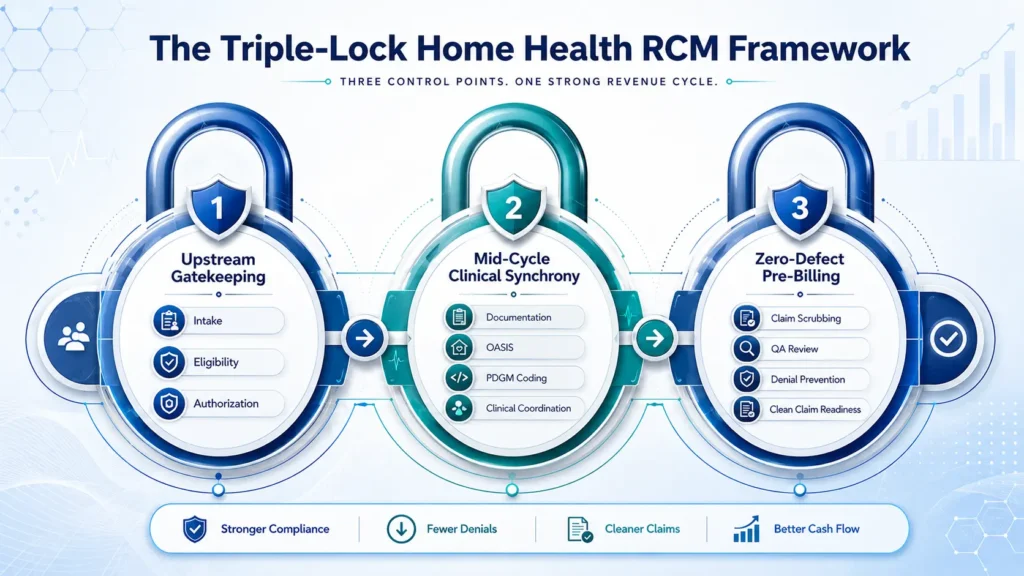
Best practices in 2026 are not about billing faster at month-end. They are about preventing revenue leakage before the claim is created. The most reliable way to organize that is the Triple-Lock Home Health RCM Framework: agencies cannot rely on claim scrubbing or clearinghouse edits alone, so they install revenue controls at three points in the cycle.
Lock 1: Upstream Gatekeeping
This is intake, eligibility, authorization, plan-type verification, and NOA timing. Require digital intake forms with mandatory fields for demographics, insurance, physician NPI/PECOS status, referral source, and payer type before a referral moves to scheduling. Verify eligibility at referral and again 24 to 48 hours before the first visit, especially for Medicare Advantage and Medicaid MCO patients. Adopt a “no authorization, no scheduling” rule for payers that require it, and track approvals by visit count, discipline, date range, and reauthorization deadline. Then decouple the NOA from OASIS completion: submit it as soon as the first billable visit and required order are met, and track acceptance separately from submission.
Lock 2: Mid-Cycle Clinical Synchrony
This is OASIS accuracy, PDGM coding, F2F tracking, LUPA monitoring, documentation completion, and visit utilization. Enforce point-of-care documentation so visit notes are completed within 24 hours, and run a daily unbilled-visit report by clinician. Require QA review of OASIS responses, ICD-10 sequencing, functional scoring, and comorbidity capture before the claim is created, with dual clinician-plus-coder review on high-risk admissions. And add a T-minus 5 LUPA alert: run a LUPA-risk report around day 25 and flag any period sitting one or two visits below the threshold for scheduling review. The goal is never to add unnecessary visits, only to make sure clinically appropriate visits are not missed or left undocumented.
Lock 3: Zero-Defect Pre-Billing
This is pre-bill QA, signed orders, coding match, claim scrubber rules, payer edits, and final claim validation. A clearinghouse can catch many format and edit errors, but it will not reliably detect a missed LUPA threshold, an understated OASIS functional level, weak medical necessity support, or a payer underpayment, because those are clinical and operational risks, not formatting errors. Put a hard stop before final billing when the plan of care, F2F, signature, or medical necessity support is missing. And segment your reporting by payer, branch, clinician, and denial reason, because blended metrics hide Medicare Advantage and Medicaid MCO problems.
| Lock | Controls | Revenue Risks Prevented | KPIs Improved |
| Lock 1: Upstream Gatekeeping | Intake validation, eligibility, authorization, NOA timing | Eligibility denials, auth gaps, late NOAs | Clean claim rate, NOA timeliness, auth lag |
| Lock 2: Mid-Cycle Clinical Synchrony | OASIS QA, PDGM coding, F2F tracking, LUPA alerts, documentation | Underpayment, coding denials, LUPA misses, unbilled visits | OASIS accuracy, case-mix accuracy, LUPA rate |
| Lock 3: Zero-Defect Pre-Billing | Pre-bill QA, payer edits, signature hard stops, final validation | Rejections, ADR exposure, preventable denials | First-pass yield, denial rate, AR days |
One thing separates agencies that improve from agencies that just buy software: an alert is not a workflow. Assign a role, deadline, escalation path, and KPI owner for every dashboard. Software supports RCM only when it is paired with clear ownership and daily follow-up, which is the whole argument for connecting your home health EMR software to a revenue cycle that someone is actually accountable for. For the regulatory backdrop behind these practices, the eCFR home health rules at 42 CFR Part 484 are the primary source.
In-House vs Outsourced vs Integrated EMR + RCM: Which Model Fits Your Agency?
The real question in 2026 is not simply “in-house or outsourced billing.” It is “who owns the clinical-to-financial workflow?” Home health revenue depends on intake accuracy, eligibility, authorization, OASIS, PDGM grouping, NOA timing, LUPA monitoring, signed orders, F2F documentation, denial follow-up, and AR recovery being connected in one reliable system. With that framing, here is how the three models compare.
| Decision Factor | In-House RCM | Outsourced RCM | Integrated EMR + RCM |
| Best fit | Large, mature agencies with stable billing teams | Agencies with turnover, denial backlogs, complex payer mix | Agencies needing clinical-to-financial alignment plus RCM |
| Staffing burden | Highest; recruit, train, retain specialized staff | Lower; vendor manages billing labor | Lower than fully in-house; staff support documentation |
| Control | Highest direct control, depends on discipline | Shared; needs clear SLAs and reporting | Shared with stronger workflow visibility |
| Visibility | Strong with dashboards; weak if manual | Varies by vendor; can be a black box | Often strongest when docs and billing share a system |
| Expertise | Depends on staff; risk if a key person leaves | Strong if vendor is home-health-specific | Strong when partner pairs EMR and RCM expertise |
| Cost structure | High fixed cost: salaries, benefits, software | Variable: % of collections or per-claim | Hybrid: software + services fee |
| Clean claim rate | Highly variable | Often improves with strong scrubbing | Can improve when EMR data flows into claims |
| AR days | Strong with experienced staff, fragile under turnover | Can improve with dedicated A/R teams | Can improve when blockers are visible pre-submission |
| Medicare Advantage | High internal burden | Good if vendor has MA workflows | Strong if auth ties to scheduling and billing |
| Main risk | Turnover, skill gaps, weak follow-up | Lost visibility, vendor dependency | Vendor lock-in, implementation effort |
In-house makes sense for larger, established agencies with stable leadership, experienced billers and coders, disciplined KPI reporting, and enough volume to justify specialized staff. The caution is concentration risk: when knowledge lives with one or two people, a single resignation can delay claims, authorizations, and posting. Outsourced makes sense when the agency is understaffed, fighting denials, struggling with AR, or managing a complex payer mix, but the partner must have home-health-specific expertise and provide transparent dashboards, denial root-cause reporting, and SLAs. Do not outsource into a black box. Integrated EMR + RCM makes sense when revenue problems originate in clinical handoffs, OASIS delays, missing orders, F2F gaps, LUPA risk, or documentation that does not support billing, and when the agency wants real-time visibility into claim blockers. It is not automatically best for every agency; it is strongest for agencies that need both documentation visibility and specialized revenue cycle execution.
Which RCM Model Fits Your Biggest Problem?
| If Your Biggest Issue Is… | Best-Fit Model | Why |
| Billing staff turnover | Outsourced RCM | Removes dependence on individual staff memory |
| Aged AR backlog | AR cleanup / outsourced billing | Dedicated follow-up teams work aging claims by value |
| OASIS/coding inconsistency | RCM + coding review | Certified coders validate case-mix before billing |
| Missing order/F2F delays | Integrated EMR + RCM | Order and signature blockers surface before final claim |
| Disconnected documentation and billing | Home health EMR and RCM | Native data flow links clinical notes to claims |
| Medicare Advantage authorization pressure | Payer-specific RCM workflow | Auth tracking tied to visit count and scheduling |
| Manual reporting | Homecare software / operating dashboard | Real-time KPI visibility replaces spreadsheets |
Before choosing any partner, ask about their average clean claim rate and AR days for home health clients, how they report denial root causes, their NOA and LUPA controls, how they handle Medicare Advantage authorizations, whether you’ll have real-time dashboards, and what happens if performance targets are missed. If your problems are mostly post-submission, outsourced home health billing may be enough. If they start upstream in documentation, integrated EMR and RCM services usually do more.
Not sure which RCM model fits your agency?
See how a connected EMR + RCM workflow links intake, OASIS, NOA, authorization, F2F, claims, and denial follow-up in one operating model, then get a model recommendation for your situation.
30-Day Action Plan to Improve Home Health Revenue Cycle Performance
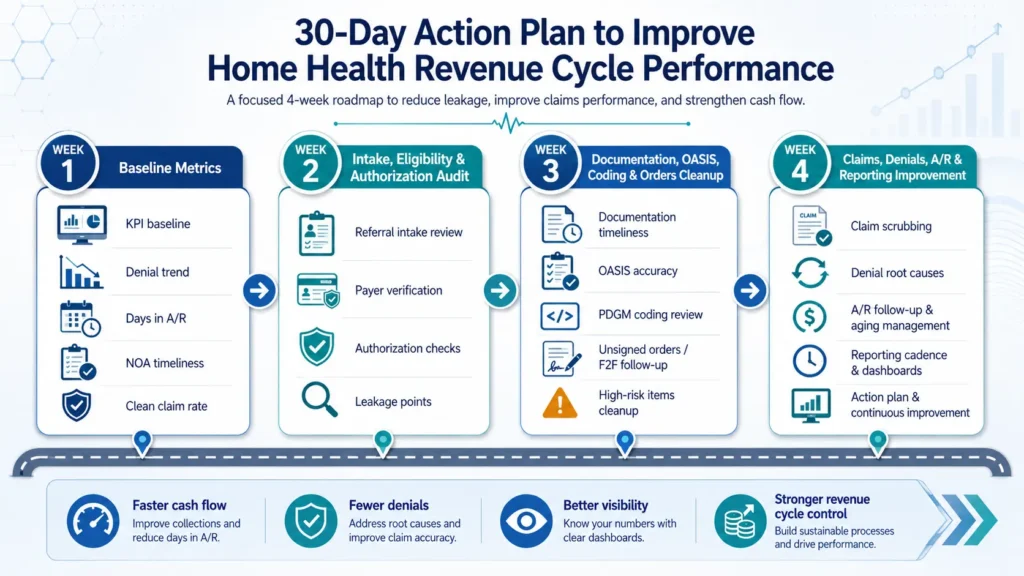
You do not need to rebuild your entire revenue cycle in 30 days. You need to find the biggest leaks, assign owners, and install the first set of controls. The fastest approach is to isolate and conquer: know your numbers, fix the front end, strengthen documentation, then tighten claims and AR.
Week 1: Establish your baseline metrics. Pull the last 90 days of RCM data and segment it by payer. Calculate clean claim rate, denial rate, AR days, AR over 90, net collection rate, NOA timeliness, and unbilled visits. Identify your top five denial reasons and worst AR aging buckets, build a one-page dashboard, and pick the two or three highest-priority gaps.
Week 2: Audit intake, eligibility, and authorization. Audit the last 30 referrals for complete demographics, insurance, physician details, and NPI/PECOS verification. Review eligibility timing and Medicare Advantage authorization tracking by visit count and date range. Build a front-end intake checklist and set the “no authorization, no scheduling” rule.
Week 3: Clean up documentation, OASIS, coding, and orders. Audit recent OASIS assessments and visit notes, review documentation completion time by clinician, and identify your most common OASIS/coding mismatches. Reinforce a 24-to-48-hour documentation rule, train on the highest-impact issues, and review unbilled-visit queues daily.
Week 4: Tighten claims, denials, A/R, and reporting. Strengthen your claim scrubber with home-health-specific rules, review 60+ and 90+ day AR by payer, categorize denials by root cause, and launch a weekly RCM huddle with billing, intake, clinical, QA, and operations. Prioritize AR by value and deadline, not chronology.
| Week | Owner | Reports Needed | KPI Improved | Expected Outcome |
| 1 | Billing manager | KPI, denial, AR aging, unbilled reports | All core KPIs | Baseline dashboard and priorities |
| 2 | Operations / intake | Referral audit, eligibility, auth logs | Clean claim rate, auth lag, denial rate | Front-end controls in place |
| 3 | Clinical director | OASIS audit, documentation, coding denial reports | OASIS accuracy, unbilled visits, clean claim rate | Faster, cleaner documentation |
| 4 | Billing manager | Scrubber, AR aging, denial dashboards | AR days, denial rate, net collection | Stronger back-end and weekly cadence |
After the first 30 days, keep a steady cadence: daily (documentation, unbilled visits, NOA tracking, rejected claims), weekly (RCM huddle, AR aging, denial root causes, LUPA-risk periods), and monthly (full KPI review, OASIS sample audit, payer performance, scrubber updates). Improvements depend on your baseline, payer mix, and team capacity, so treat targets as internal goals rather than guarantees. A connected homecare operating system makes this cadence far easier to sustain because the reports and work queues live in one place.
Download the 30-Day Home Health RCM Checklist
A week-by-week action plan your billing, clinical, and operations teams can use to baseline KPIs, fix front-end workflows, clean up documentation, and tighten denials and A/R.
Download the 30-Day RCM ChecklistWhen Should a Home Health Agency Request an RCM or Billing Audit?
An audit is not about blaming your staff. It is about finding where cash is getting stuck before revenue leaks become write-offs, recoupments, or chronic AR problems. The best time to ask is when the early warning signs appear, not after AR is already out of control.
Warning Signs Your Revenue Cycle Needs an Audit
Request a review when you see two or more of these inside a 30-to-60-day window: AR days creeping up, A/R over 90 days growing, the same denial codes repeating, clean claim rate dropping, unbilled visits piling up, OASIS or documentation delays, Medicare Advantage authorizations slowing payment, an EMR or billing vendor transition that left workflows shaky, rising ADRs exposing documentation gaps, an unexplained LUPA spike, or leadership operating without segmented KPI visibility. Any one of these is worth watching. Two or more together usually means the problem is systemic.
What a Home Health RCM Audit Should Review
A strong audit connects clinical documentation to financial outcomes. It should establish a current KPI baseline, analyze AR aging and recoverability, break down denials by root cause and payer, review documentation timeliness and OASIS-coding alignment, check F2F and plan-of-care signatures, review NOA timeliness and LUPA risk, quantify unbilled visits, compare expected against actual payment, assess payer setup, and evaluate EMR and vendor performance.
What You Should Receive After the Audit
A useful audit leaves you with more than a list of complaints. It should hand leadership a payer-level KPI baseline, a denial root-cause analysis, an AR aging and recoverability review, a documentation and OASIS alignment review, an unbilled-visit and underpayment estimate, and a prioritized recovery plan with owners and timelines. That is the difference between knowing something is wrong and knowing exactly what to fix first.
What Your Free Home Health RCM Gap Audit Can Include
- KPI baseline by payer
- Clean claim and denial review
- AR aging review
- A/R over 90 risk scan
- NOA timeliness review
- LUPA exposure review
- OASIS/coding alignment review
- Unbilled visit analysis
- Underpayment review
- EMR/billing workflow assessment
- 30-day recovery roadmap
Stop guessing. Get a payer-level view of your revenue cycle.
If your agency is working harder but collecting slower, request a confidential RCM gap audit, or see how a connected EMR + RCM workflow protects cash flow from intake to paid claim.
How EliteMed Financials Helps Home Health Agencies Strengthen RCM
EliteMed Financials works as a home health operating partner, not just a billing vendor or a software login. The goal is to connect clinical documentation, billing and RCM execution, denial prevention, AR follow-up, and revenue cycle visibility so there are fewer blind spots from intake to paid claim. That includes home health billing services and denial management for agencies fighting AR and rejections, home health EMR and RCM integration for agencies whose documentation and billing live in separate worlds, and connected homecare software for agencies that want one operating system instead of a stack of disconnected tools. Whether your agency needs a billing audit, outsourced RCM support, or a connected EMR + RCM workflow, the objective is the same: protect cash flow before it leaks.
Frequently Asked Questions About Home Health Revenue Cycle Management
What is home health revenue cycle management?
Home health revenue cycle management is the end-to-end process of managing an agency’s financial lifecycle from referral and eligibility verification through OASIS documentation, coding, claim submission, payment posting, and denial resolution. It connects clinical documentation, PDGM rules, NOA timing, and payer requirements to reimbursement accuracy and cash flow, making it far more than billing.
What are the stages of home health RCM?
Home health RCM runs in seven connected stages: intake with eligibility and authorization, start of care and Notice of Admission, OASIS-E assessment and PDGM coding, order management and Face-to-Face certification, pre-bill scrubbing and QA review, final claim submission and payment posting, and denial management with A/R follow-up. Clinical and financial work happen at the same time across a 30-day period.
What are the most important KPIs for home health RCM?
The core dashboard includes clean claim rate, first-pass yield, denial rate, days in A/R, A/R over 90 days, net collection rate, NOA timeliness, and LUPA rate. Track five to eight metrics rather than dozens, and segment each by payer, branch, and denial reason, since blended numbers can hide Medicare Advantage delays, MCO authorization problems, or a single branch driving most denials.
How can home health agencies reduce AR days?
Reduce AR days by speeding documentation completion, improving claim readiness before submission, posting payments daily, and working denials by root cause and payer rather than chronologically. Segment AR by payer so Medicare Advantage or Medicaid MCO delays do not hide inside a blended number, and build dedicated work queues for claims aging past 60 and 90 days.
How can home health agencies reduce denials?
Denials drop when agencies fix the source instead of reworking claims. Verify eligibility and authorization upfront, submit NOAs on time, align OASIS with diagnosis coding, complete F2F and signed orders before billing, and run a home-health-specific claim scrubber. Then categorize every denial by payer and reason code and feed the pattern back into intake, documentation, and QA.
Should home health agencies outsource revenue cycle management?
Outsourcing can help agencies facing staffing gaps, billing turnover, denial backlogs, aged A/R, or complex payer mixes. The key is choosing a partner with home-health-specific expertise in PDGM, OASIS, NOA, LUPA, and Medicare Advantage authorizations, plus transparent dashboards, denial root-cause reporting, and clear SLAs. Outsourcing without visibility simply trades one problem for a black box.
What are the benefits of integrated EMR and RCM services for home health?
Integrated EMR and RCM connects intake, OASIS, authorization, NOA, F2F, orders, claims, and denial follow-up in one workflow. That reduces clinical-to-billing handoff errors, surfaces documentation blockers and LUPA risk before the claim drops, and gives leadership real-time visibility into where revenue is stuck. It is strongest for agencies whose revenue problems start in documentation rather than after submission.
What should a home health RCM audit include?
A home health RCM audit should review intake accuracy, eligibility, authorization, NOA timeliness, OASIS/coding alignment, F2F and order tracking, LUPA exposure, unbilled visits, denial root causes, A/R aging, underpayments, payer setup, and KPI visibility. The strongest audits end with a prioritized 30-day action plan that names owners, reports, and target outcomes.
Conclusion
Home health revenue cycle management is now a margin-protection strategy. With CMS tightening payment for 2026, OASIS-E2 reshaping documentation, PDGM recalibrating case-mix, and Medicare Advantage adding authorization friction, the agencies that hold their cash flow steady are the ones that connect intake, authorization, OASIS, PDGM coding, NOA timing, LUPA monitoring, claim QA, denial management, and A/R follow-up into one accountable workflow. Every upstream decision either protects reimbursement or quietly leaks it.
If your agency is dealing with rising AR, repeating denials, or a slipping clean claim rate, the fastest path forward is a clear-eyed look at where revenue is getting stuck. If your documentation, billing, and reporting feel disconnected, the answer may be tighter integration between your EMR and your revenue cycle. Either way, the next step is the same: stop guessing and get a payer-level view of your numbers.
Stop guessing. Get a payer-level view of your revenue cycle.
If your agency is working harder but collecting slower, request a confidential RCM gap audit, or see how a connected EMR + RCM workflow protects cash flow from intake to paid claim.