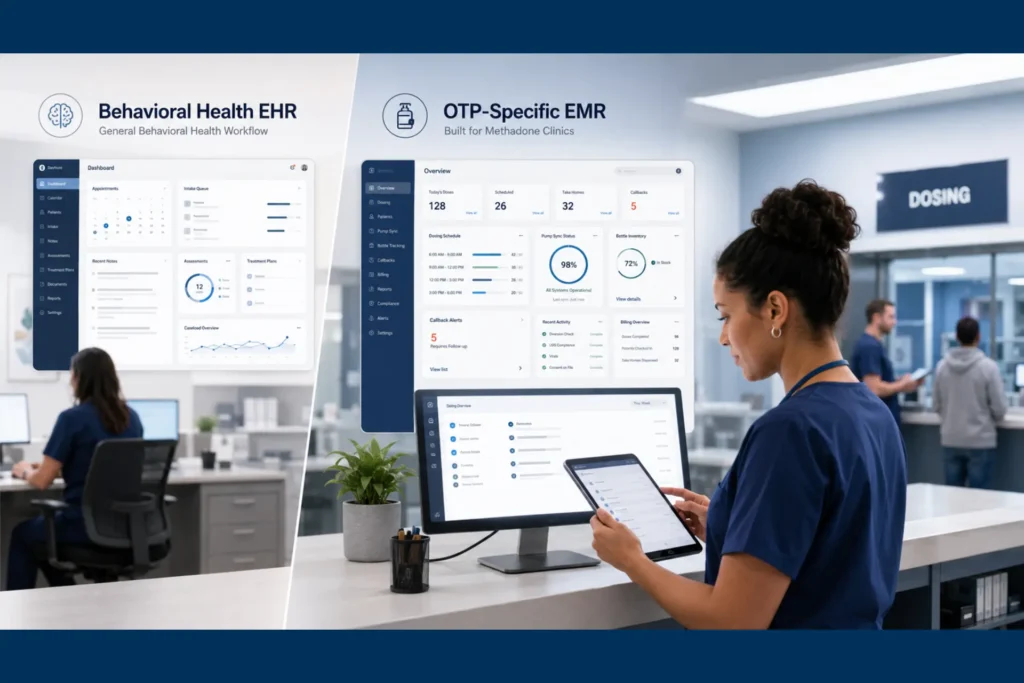
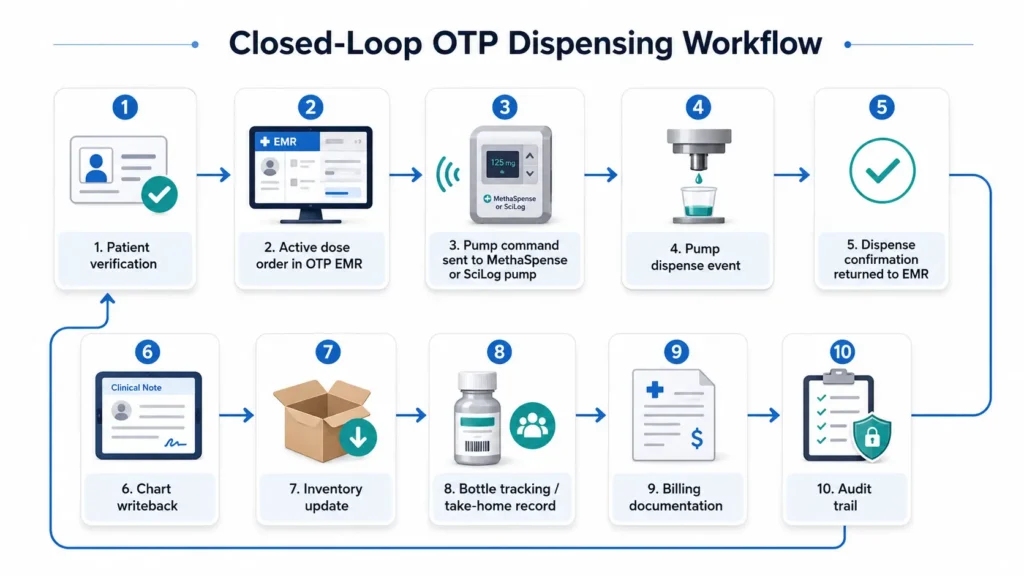
MethaSpense and SciLog integration, in the context of an opioid treatment program (OTP), means connecting the clinic’s electronic dispensing hardware — either the IVEK MethaSpense or the Parker SciLog LabTec — directly to the EMR so that the dose order, pump command, dispense confirmation, patient chart, inventory record, bottle tracking, and billing documentation stay synchronized in one workflow.
When a clinic relies on manual documentation, the same data gets typed twice: once into the pump keypad, once into the chart. Inventory is reconciled at the end of the day from paper logs. Bottles are labeled by hand. Billing teams chase paper. A true OTP-native EMR can reduce those manual handoffs by connecting the pump to the clinical record, inventory workflow, and billing documentation layer.
This guide explains what MethaSpense and SciLog pump integration actually means, how it works inside a real OTP dosing window, what distinguishes native integration from middleware-dependent workarounds, and what questions buyers should ask before trusting any EMR with a controlled-substance workflow.
TL;DR MethaSpense (IVEK) and SciLog LabTec (Parker) are commonly used automated methadone dispensing systems in OTP clinics. Integrating either pump with an OTP EMR means the system sends the verified dose order to the pump, receives the actual dispensed volume back, and writes that event to the patient chart, inventory ledger, and billing record without duplicate nurse entry. Clinics evaluating MASE OTP EMR or any other platform should verify this full loop — not just whether a pump connection screen exists.
Key takeaway: MethaSpense + SciLog integration is not just a pump connection. In an OTP clinic, the goal is to synchronize the verified dose order, physical pump dispense, patient chart, inventory ledger, bottle tracking, billing documentation, and audit trail into one controlled workflow.
1. What MethaSpense + SciLog Integration Means for OTP Clinics
What is MethaSpense integration?
MethaSpense integration refers to connecting the IVEK MethaSpense controlled substance dispensing system — a positive-displacement, ceramic-piston pump designed specifically for drug addiction management clinics — to the clinic’s OTP EMR. The integration allows the EMR to send a verified dosing command to the MethaSpense, receive confirmation of the actual volume dispensed, and write that event directly into the patient record and inventory log.
Answer-ready definition: MethaSpense integration in an OTP clinic means the EMR sends the exact verified dose to the IVEK MethaSpense pump and receives the actual dispensed amount back, updating the patient chart, inventory, and compliance records without requiring nurses to re-enter the data.
What is SciLog pump integration?
SciLog pump integration means connecting the Parker SciLog LabTec automated liquid dispensing system to the OTP EMR through a USB or RS-232 serial connection. The LabTec is designed for high-precision, computer-controlled dispensing, communicating over a dedicated COM port using manufacturer-specific ASCII commands. Like MethaSpense, integration means the EMR can push a dose command, receive a dispense confirmation, and update clinical, inventory, and billing records from that hardware event.
What data should move between the EMR and pump?
At minimum, a functioning OTP EMR pump integration should support the following data flow in both directions:
EMR → Pump: Patient ID, exact dose amount (mg/mL), active order reference, nurse authentication.
Pump → EMR: Actual volume dispensed (mL), exact timestamp, pump serial number, dispense completion status, fault or alarm codes if applicable.
That return payload — what the pump sends back — is the critical test of real integration. An EMR that sends a command but never reads back the actual dispensed volume is not providing closed-loop integration. It is providing one-way pump actuation.
Why this matters in methadone clinic operations
Methadone is a Schedule II controlled substance. OTPs are subject to DEA inventory requirements under 21 CFR Part 1304, SAMHSA operational standards under 42 CFR Part 8, and Joint Commission or CARF accreditation requirements. Every milliliter of liquid methadone must be accounted for — from bulk bottle receipt through patient administration or take-home dispensing through destruction or waste.
When the pump and the EMR are disconnected, those records exist in two separate systems. End-of-day reconciliation becomes a manual exercise comparing paper pump logs against chart entries against the pharmacy inventory ledger. That friction creates audit risk, documentation gaps, and billing problems.
A well-configured OTP clinic software platform can reduce that friction by making the pump a connected node in the clinical record — rather than a standalone hardware peripheral relying on manual documentation.
2. How Methadone Pump Dispensing Works in a Real OTP Workflow
Before evaluating pump integration, it helps to understand the full dosing-window sequence. Most OTP clinics run a high-volume morning queue — often 100 to 300 patients before midmorning. Every step in that sequence must be both clinically safe and documentable.
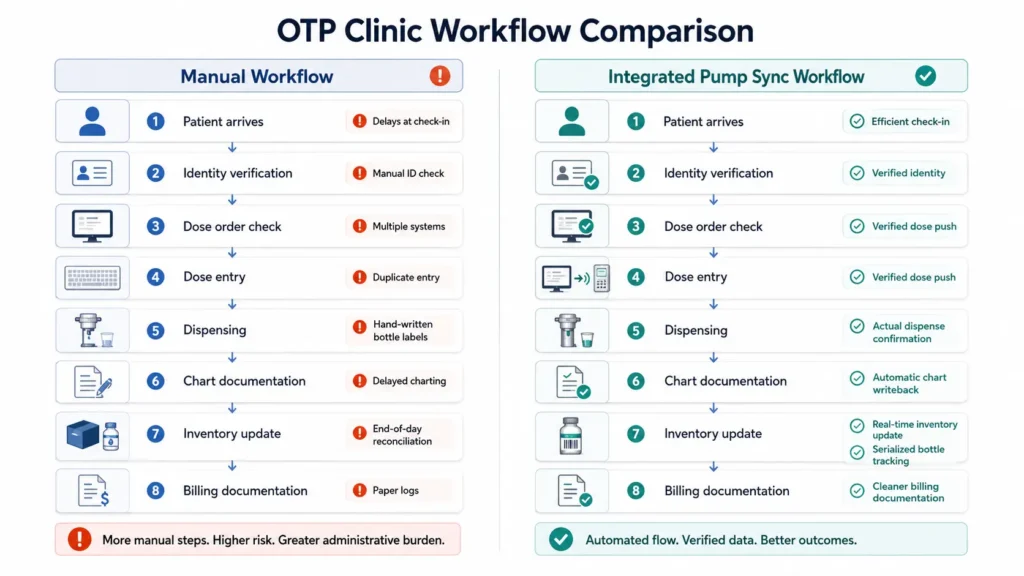
Manual workflow vs integrated pump sync
| Step | Manual (Non-Integrated) Workflow | Integrated Pump Sync Workflow |
|---|---|---|
| Patient arrives | Staff check paper log or find chart manually | Patient check-in triggers chart pull; order validated automatically |
| Identity verification | Staff ask name/DOB verbally or check photo ID | Barcode scan or biometric verification confirms patient identity |
| Order check | Nurse manually reviews paper Rx or chart | EMR runs active-order validation in background, flags holds |
| Dose entry | Nurse manually types dose into pump keypad | EMR sends verified dose command directly to pump |
| Dispensing | Pump pours; nurse watches volume on pump display | Pump pours; EMR receives actual mL confirmation |
| Chart documentation | Nurse hand-writes or manually enters chart note after dosing | EMR auto-writes administration note with actual dose, timestamp, nurse ID |
| Inventory | Paper count updated by hand; reconciled end-of-day | Inventory decrements from pump event (timing should be confirmed per platform) |
| Take-home | Paper label written by hand | Serialized label generated at moment of pour (when configured) |
| Billing documentation | Billing team manually pulls chart data | Dose event supports billing record with administration timestamp |
Where manual workflows create risk
The highest-risk moments in a non-integrated workflow are the transition points: between the pump’s internal log and the nurse’s chart entry, between the chart note and the pharmacy inventory count, and between the daily inventory and the DEA 222 reconciliation.
Each manual transfer is a potential transcription error, a timing gap, or a missing signature. A skilled nurse working a 200-patient morning queue under time pressure is not the right control point for catching inventory discrepancies at the milliliter level.
Integrated pump sync can shift those control points into the software layer, where each event is timestamped and attributed automatically. The nurse’s role shifts from data entry toward clinical observation.
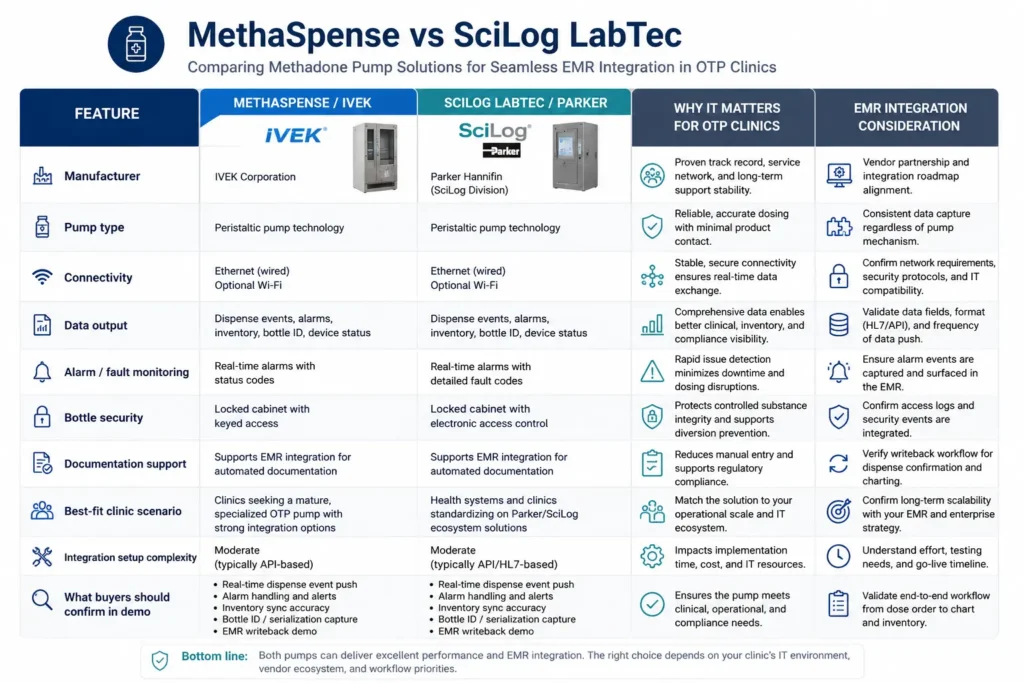
3. MethaSpense vs SciLog LabTec: What OTP Clinics Need to Know
Both pumps are used in U.S. methadone clinics. They differ in mechanical design, connectivity approach, and documentation characteristics. An OTP evaluating EMR software needs to understand which pump they use — and verify that the EMR supports that specific model and configuration.
What is IVEK MethaSpense?
The MethaSpense is manufactured by IVEK Corporation and is designed specifically for use in drug addiction management clinics. It uses a positive-displacement ceramic pump module with a high-speed brushless DC motor and ceramic piston/cylinder components. The design prioritizes accuracy and minimizes moving parts in the fluid path.
A notable hardware feature is the Liquid Eye bubble detector, which monitors the fluid line for air gaps. If an air bubble is detected, the pump can halt the dispense and trigger an alarm before an inaccurate dose is poured. The MethaSpense also includes a key-lock supply bottle housing and a Zero Transfer-style bottle cradle designed to minimize medication loss during bottle changes.
From a connectivity perspective, the MethaSpense communicates with patient management software via RS-232 serial or USB serial interface. The exact communication protocol, baud rate, and ASCII command structure should be confirmed with IVEK for the specific model deployed. Clinics should verify the exact COM port, cable type, and driver requirements with their EMR vendor before go-live.
What is SciLog LabTec?
The SciLog LabTec is manufactured by Parker Hannifin (Parker Bioscience Division) and is described in Parker documentation as an automated liquid methadone dispensing system designed for methadone treatment centers. It supports both volumetric (volume-based) and weight-based dispensing and is noted for high-precision output and documentation of methadone usage for government compliance and inventory control.
The LabTec connects to clinic software via RS-232 serial and/or USB using manufacturer-specific ASCII communication. Per Parker SciLog LabTec product documentation, the PC interface uses a USB Type B cable, a designated COM-port assignment, and serial settings of 9600 baud, 8 data bits, 1 stop bit, and no flow control (8N1). The system outputs documented fields including dispensed volume (DV), cumulative volume (CV), pressure readings (P1), and status (ST). It also supports printer output for paper-based documentation if required.
Comparison table
| Feature | MethaSpense / IVEK | SciLog LabTec / Parker | Why it matters | EMR integration note |
|---|---|---|---|---|
| Manufacturer | IVEK Corporation | Parker Hannifin | Both are established industrial hardware manufacturers | Vendor support differs — confirm EMR vendor supports both |
| Pump type | Positive displacement, ceramic piston | High-precision piston/peristaltic | Both deliver accurate volumetric dosing | Accuracy claims should be verified per model spec |
| Bubble/air detection | Liquid Eye detector (air gap alarm) | Pressure alarm / backpressure monitoring | Reduces risk of inaccurate pour from air in line | EMR should capture alarm event; confirm with vendor |
| Bottle security | Key-lock supply bottle, Zero Transfer cradle | Bottle sinker + stainless steel holder | Reduces medication loss during refill | Not an EMR integration point, but a workflow factor |
| Primary connectivity | RS-232 serial / USB serial | RS-232 / USB Type B, 9600 baud 8N1 | Both require local COM-port mapping | Confirm exact cable and driver per workstation OS |
| Data output | Manufacturer-specific ASCII; actual volume return | DV, CV, P1, ST fields via ASCII | Structured output enables chart writeback | EMR must parse return payload into chart fields |
| Printer/PC output | PC-based documentation | Printer and PC documentation | Paper backup available if needed | Native EMR writeback is preferable to printer-only mode |
| Published tech depth | Lighter published integration documentation | Richer published connectivity specs | Affects how much buyers can verify independently | Ask both vendors to show live integration proof |
| Best fit | Clinics prioritizing bottle security and bubble detection | Clinics with existing Parker hardware or weight-based needs | Neither is universally superior | EMR compatibility matters more than pump brand preference |
Important: Clinics with mixed MethaSpense and SciLog stations should confirm their EMR vendor supports both device types natively. The EMR must be able to map each pump to the correct COM port, handle both manufacturers’ ASCII command dialects, and parse each device’s return payload into the same structured chart fields. This should be demonstrated live in the demo — not described in a slide deck.
4. Why Most EMRs Do Not Sync Cleanly with Methadone Pumps
The honest answer to “does your EMR support pumps?” is that almost every OTP-adjacent platform will say yes. What varies dramatically is how that support is implemented — and how it fails.
Cloud EMRs were not built to control local methadone pumps
Most modern EMRs are browser-based, cloud-hosted platforms. Methadone pumps are local serial hardware connected by a physical cable to a workstation sitting on a clinic counter. Bridging a cloud application to a local COM port is not trivial. It typically requires a local service, driver, or middleware layer running on the workstation to translate cloud commands into serial device communication.
When that middleware layer is fragile, missing, or version-mismatched, the integration fails silently. The nurse enters the dose, the pump dispenses, and the chart appears to update — but the actual dispensed volume never returned, or the inventory never decremented, or the event was queued in a batch job that runs at midnight.
RS-232, USB drivers, and COM ports create hidden failure points
Methadone pumps communicate through legacy serial protocols — RS-232 or USB-as-serial. This means each pump needs a specific cable, a driver installed on the workstation, and a correctly assigned COM port number. If the COM port changes after a Windows reboot, if the USB cable shifts slightly, or if a driver is updated by an IT team, the pump connection breaks.
The clinic’s nurses are not expected to diagnose COM-port mapping failures at 6:00 AM during the morning dosing queue. If the EMR vendor does not own that failure path — from cloud server through the local device layer — the clinic ends up in a three-way support call between the EMR vendor, the pump manufacturer, and its own IT team.
Middleware makes the pump connection fragile
Some competitor support documentation shows pump integration as a configuration-heavy process involving connector settings, test connections per dispensing user, and manual COM-port setup. That does not automatically make the workflow weak — but it does mean buyers should ask: how does the vendor handle failures? Who owns the device pathway? Does the chart receive the actual pump-confirmed dispense event in real time, or is reconciliation handled separately?
If you are comparing platforms and want to understand how OTP-specific workflows differ from general behavioral health EMR functionality, this AZZLY Rize alternative for methadone clinics guide covers key OTP workflow differences across common platforms.
Batch upload is not the same as real-time bidirectional sync
Some platforms offer pump “integration” that amounts to manual log uploads or end-of-day batch reconciliation. The nurse doses the patient, the pump generates an internal log, and later — that night or the next morning — someone exports the pump log and imports it into the EMR. Chart, inventory, and billing records are always one batch behind.
This creates the worst outcome: the clinic believes documentation is happening automatically, while actually running a delayed, error-prone reconciliation process that creates inventory discrepancies, audit gaps, and billing delays.
Why generic behavioral health EMRs are often not enough for OTPs
A behavioral health EHR designed primarily for therapy notes, group documentation, and outpatient billing is not the same as an EMR purpose-built for OTP methadone dispensing. The former was designed to document conversations. The latter needs to control hardware, receive telemetry, reconcile a Schedule II controlled-substance inventory, and support a weekly HCPCS G-code billing workflow — all during a high-volume morning dosing line.
“We have an API” is not pump integration. An open API means a developer can write a custom bridge — which the clinic then needs to maintain, test, and troubleshoot independently.
| Integration Failure | Operational Impact | What an OTP-Native EMR Should Do |
|---|---|---|
| COM-port mismatch after reboot | Pump won’t receive commands; nurse falls back to manual | Auto-detect and remap; alert staff before dosing starts |
| Middleware crashes during dosing | Dose dispensed but chart never updated | Own the device layer; no external process to crash |
| Batch upload delays chart writeback | Billing and inventory are always one day behind | Real-time writeback from pump confirmation event |
| No actual-mL return | Chart shows ordered dose, not actual dispensed dose | Parse and store pump return payload per dispense event |
| No fault capture | Liquid Eye or backpressure alarms invisible to staff | Surface alarm codes on nurse and supervisor dashboard |
| No take-home serialization | Bottles tracked by paper label; callback gap | Generate serialized bottle record at moment of pour |
| Generic exception handling | Partial doses, spills, and cancellations create inventory ghost entries | Distinct exception workflow per event type with audit log |
5. MASE’s Native Integration Architecture: From Dose Order to Pump to Chart
Answer-ready explanation: MASE’s native integration architecture is designed to connect the methadone dose order, pump command, dispense confirmation, chart writeback, inventory update, billing record, and audit trail inside one closed-loop OTP workflow. The workflow below describes MASE’s intended architecture based on product positioning. Final capabilities — including exact pump model support, workstation requirements, and implementation scope — should be confirmed in a live demo.
MASE is positioned as an OTP-native EMR built specifically for methadone clinics from day one — not a behavioral health platform adapted for OTP workflows.
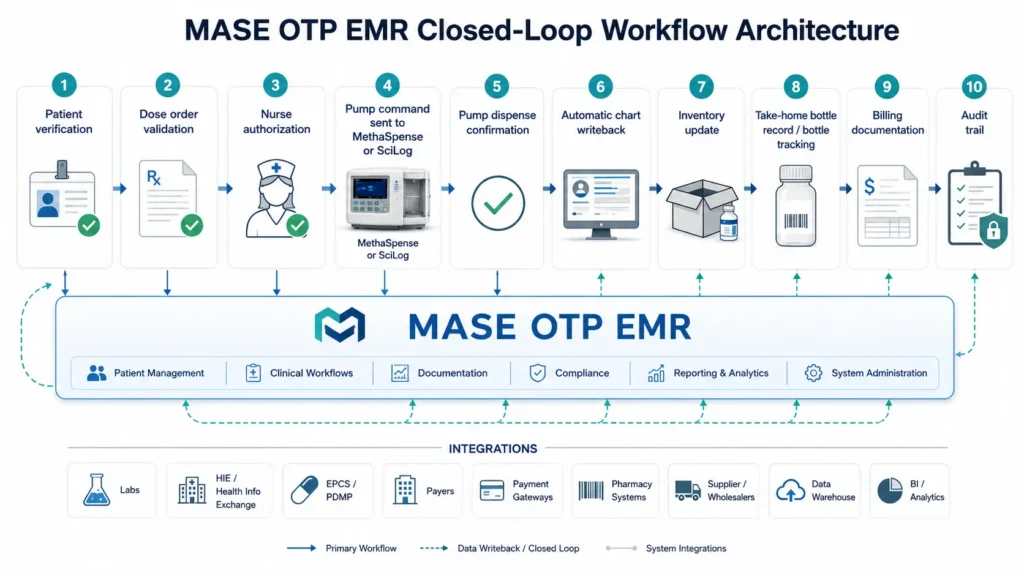
The intended MASE workflow
Patient verification. When a patient arrives at the dosing window, MASE is designed to confirm identity through the active patient record. In configurations with biometric or barcode verification, the EMR validates the patient before any pump command is issued.
Order validation. MASE checks the active physician order, any clinical holds, missed-day rules, pending UDS results, and dose change flags in the background. If any exception exists, the system flags it before the nurse begins the dispense workflow.
Pump command. When the nurse initiates the dose, MASE is designed to send the verified dose directly to the connected MethaSpense or SciLog LabTec pump using manufacturer-specific communication. Whether this uses direct COM-port communication or a device bridge layer should be confirmed with MASE engineering.
Dispense confirmation. After dispensing, the pump is designed to return a confirmation payload to MASE — including the actual volume dispensed, a timestamp, the pump serial number, and any fault codes or alarm states. Ask MASE to demonstrate actual-mL return in a live device demo, not a simulated screen.
Chart writeback. MASE is designed to write a structured administration note to the patient chart automatically after the pump confirms the dispense event — capturing actual dose, nurse ID, timestamp, and device identifiers without requiring the nurse to re-enter any data.
Inventory update. The dispensed volume should decrement from the active bulk bottle inventory in the EMR’s controlled-substance ledger, supporting bulk-to-dose reconciliation. Whether this update is real-time or batch-based should be confirmed in demo.
Bottle tracking. For take-home doses, MASE is positioned to generate serialized bottle records linked to the pump event, patient chart, and bulk bottle lot. Callback automation workflows should be confirmed with MASE directly.
Billing documentation. The confirmed dispense event creates a documented administration record with the timestamp, patient, service details, and encounter linkage needed to support weekly OTP bundle billing claims. Automatic G-code triggering should be verified in demo.
Audit trail. Every step — order validation, pump command, dispense confirmation, exception handling, and inventory movement — is designed to generate a timestamped, user-attributed audit log.
Ask Us to Prove the Pump Writeback Live
In your MASE demo, watch the real pump event return to the chart — not a manual test record, not a CSV upload, and not a delayed batch export. See actual mL, timestamp, and nurse ID write back automatically.
6. What “All Pump Lights Synced” Means in Daily OTP Operations
In plain language, “all pump lights synced” means the EMR dashboard shows the current operating status of every connected MethaSpense and SciLog LabTec pump in a central view — so nurses, charge nurses, and supervisors can see which pumps are ready, actively dispensing, paused, faulted, or offline without walking station to station.
This matters because a high-volume OTP clinic is not a one-pump operation. Many clinics run multiple dosing windows simultaneously during the morning rush. A charge nurse managing six stations needs to know which pumps are available, which are occupied, and which need attention — before the next patient reaches the window, not after.
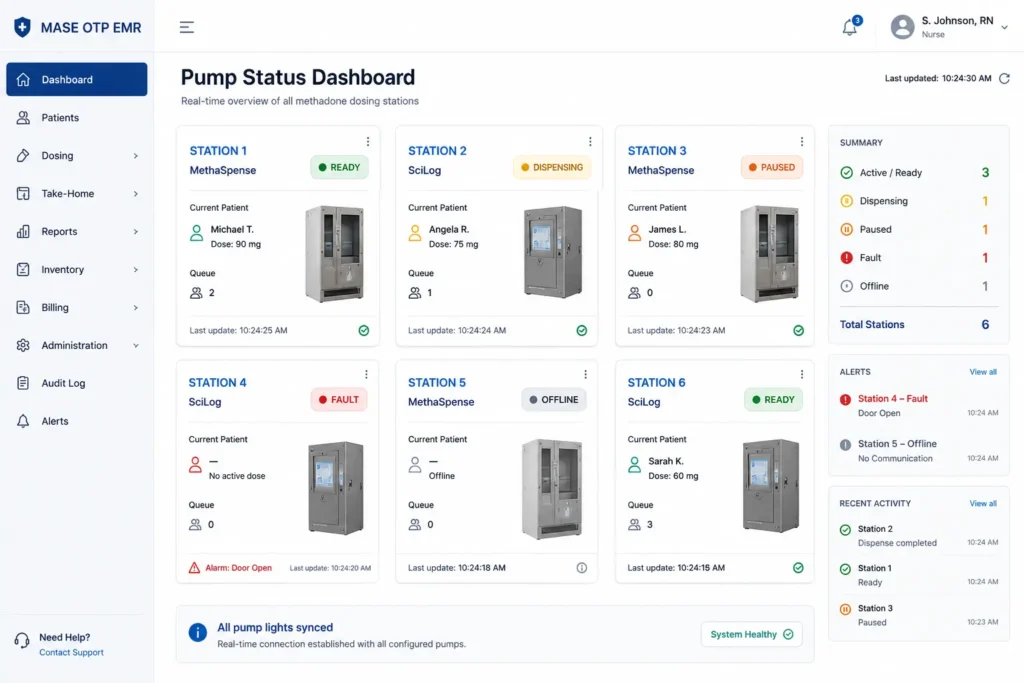
Pump status visibility in practice
The MethaSpense displays status via physical indicators: READY, DISPENSE, PRIME, WAIT, and FAULT states, with a Liquid Eye alarm for air-gap detection. The SciLog LabTec uses its LCD panel and motor state to communicate status, including active dispensing, stopped/idle, and pressure alarm states.
A properly integrated EMR dashboard should mirror these key operating states digitally, so supervisors see what the pump’s own display shows — without standing at the workstation. The exact statuses captured by MASE, including whether Liquid Eye and SciLog backpressure alarm states are surfaced, should be confirmed with MASE engineering.
Mismatch alerts and operational visibility
When a pump goes offline, reports a calibration issue, or enters a fault state that doesn’t resolve, the dashboard should generate an actionable alert — showing which station is affected, the last known patient or transaction, and what staff should do next.
This kind of proactive visibility helps staff respond to pump issues before they cause dosing delays. It also creates a timestamped record of pump state changes around each dispense event, which supports diversion-control reviews, incident investigation, and DEA audit readiness. Whether MASE’s dashboard includes these features should be verified in demo.
| Pump State | What It Means | Why It Matters to OTP Staff |
|---|---|---|
| READY | Pump is online and ready to receive a command | Safe to send the next patient to this station |
| DISPENSING | Active pour in progress | Station occupied; route next patient elsewhere |
| FAULT / ALARM | Hardware error or alarm detected | Stop workflow; investigate before next dose |
| OFFLINE / DISCONNECTED | Communication lost with pump | Check cable, COM port, and driver; escalate to IT |
| CALIBRATION REQUIRED | Pump accuracy drift flagged | Do not dose until calibration is completed and logged |
7. Diversion Control, Bottle Tracking, and Inventory Reconciliation
Methadone diversion is a real regulatory risk for OTP clinics. Federal standards under 42 CFR Part 8 require clinics to maintain a written Diversion Control Plan and document all take-home dispensing, callbacks, and bottle returns. DEA requirements under 21 CFR Part 1304 mandate perpetual inventory records for Schedule II substances.
Pump integration supports diversion control by creating a documented chain of custody from ordered dose through actual dispense through inventory movement. It does not prevent diversion — staff behavior, clinical decision-making, and policy enforcement do that — but it can help reduce manual documentation gaps that create audit exposure.
Actual-vs-ordered dose tracking
The most direct diversion-control value of pump integration is the ability to compare the ordered dose against the actual volume the pump confirms it dispensed. If those values consistently match, the workflow is functioning correctly. If a systematic gap appears — over-pours, under-pours, or doses logged without a corresponding pump confirmation — the system can surface that discrepancy for review.
Whether MASE stores ordered and actual dispensed volumes as distinct fields and generates variance alerts should be confirmed with MASE.
Take-home bottle serialization
When a patient is eligible for take-home doses, the dispensing event should create more than a generic “take-home given” note. A well-configured OTP EMR should link each take-home bottle to a unique identifier, the patient chart, the dispense date, the dose amount, and the bulk bottle lot number — generating a serialized record that can be verified when the bottle is returned or when a callback is conducted.
MASE is positioned to support serialized bottle tracking. Whether this includes QR code or barcode label generation at the moment of dispense, native callback scheduling, and bottle scan verification should be confirmed in a live demo.
Inventory reconciliation
Inventory reconciliation in an OTP means comparing three things: what was ordered (the prescribed dose), what the pump dispensed (actual mL confirmed by hardware), and what remains in the bulk methadone bottle (physical stock). These three figures should align. When they don’t, the discrepancy needs an explanation.
A pump-integrated EMR can reduce the manual effort of this reconciliation by tracking actual dispensed volume against the active bulk bottle, so discrepancies surface earlier rather than during a multi-hour end-of-day closeout. Real-time vs batch reconciliation behavior should be verified.
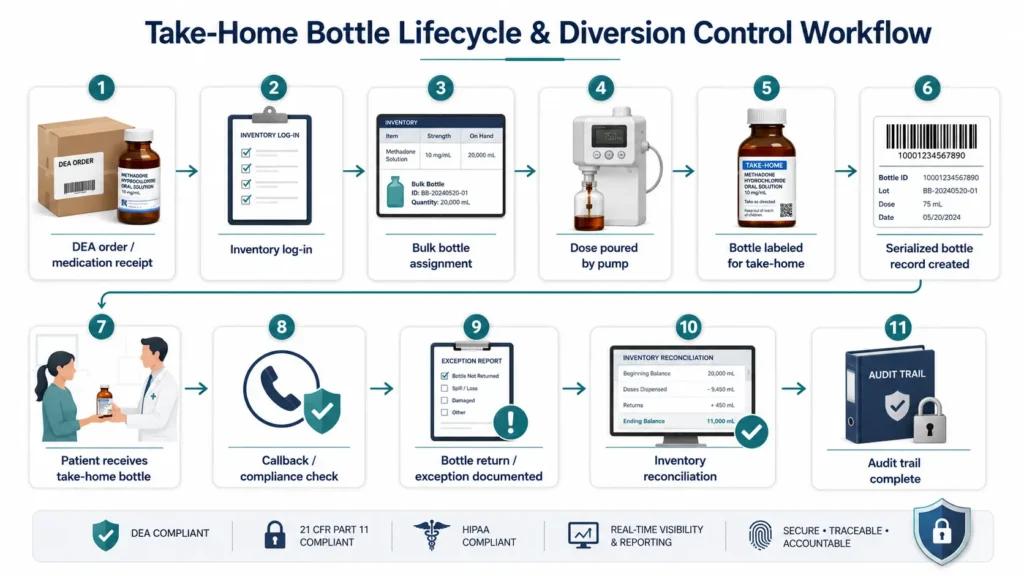
Bottle lifecycle and audit readiness
A complete bottle lifecycle record covers: DEA Form 222 receipt → inventory log-in → dose poured → bottle labeled → patient takes home → callback conducted → bottle returned or exception documented → inventory updated.
Each step should produce a timestamped, user-attributed record. Together, these records support the audit trail that DEA inspectors, SAMHSA surveyors, and CARF/Joint Commission reviewers look for when assessing whether the clinic’s controlled-substance procedures are functioning.
Important compliance note: No software platform can guarantee DEA compliance or eliminate diversion risk. Final compliance depends on clinic policy, staff execution, training, and applicable federal and state regulations. MASE and any other platform should be evaluated as a documentation support tool, not a compliance guarantee.
How Pump Documentation Supports OTP Billing Services
Pump integration does not bill the claim by itself. Its value is that it creates cleaner dosing documentation for billing review: who was dosed, when the dose was administered, whether it was observed or take-home, whether an exception occurred, and whether the chart supports the service being billed.
For clinics using separate billing support, this documentation can help the billing team review missed doses, take-home days, replacement doses, and claim-support records more efficiently. This is where MASE OTP EMR and EliteMed’s OTP billing services should work together: the EMR strengthens the dosing record, and the billing team uses that record to support cleaner revenue cycle management — including G-code bundle claims, take-home day calculations, and payer audit responses.
8. Pump Failure Modes, Calibration, and Exception Handling
Most EMR marketing focuses on the happy path: patient arrives, order validates, pump fires, chart updates, done. The real test of an OTP EMR’s pump integration is what happens when the happy path doesn’t happen.
This section covers the failure modes that create compliance risk, inventory discrepancies, and billing problems in OTP clinics — and what a well-designed EMR should do when each one occurs.
Pump offline or disconnected
If the pump loses communication with the workstation — due to a cable issue, COM-port reassignment after a Windows update, driver failure, or local service crash — the EMR should immediately surface a disconnected status and prevent any dispense command from being issued.
What the EMR should capture: timestamp of disconnect, pump serial, last known patient/order, nurse who attempted the dose, reason for failure.
What should happen next: the system should prompt staff to check the physical connection, run a port rescan, or route the patient to a backup station. Any manual fallback should be documented as a manual override with a reason code — not silently recorded as a successful dose.
COM port or driver issues
RS-232 and USB-serial connections are stable when properly configured and left alone. They break when Windows remaps COM ports after a reboot, when a USB cable is swapped, or when an IT team pushes an OS update that changes driver behavior.
Clinics should ask their EMR vendor: does the system auto-detect pump reconnection? Does it alert staff before dosing begins if a pump is not responding? Who handles the support ticket when the port fails at 6:30 AM?
Partial dispense
A partial dispense occurs when the pump delivers some but not all of the ordered volume — due to a Liquid Eye bubble alarm (MethaSpense), tubing blockage (SciLog), pressure alarm, or mid-dispense interruption.
The EMR must not record this as a complete successful dose. It should capture the actual volume delivered, the reason for interruption, the alarm or fault code, and the nurse’s action. The inventory record should reflect only the actual volume dispensed. If a remainder is queued for a second delivery, that should be tracked as a continuation of the same encounter — not a new billable event.
Calibration drift
Both MethaSpense and SciLog LabTec require regular calibration checks to confirm that the volume shown on the screen matches the volume actually delivered. Per Parker documentation for the SciLog LabTec, calibration verification involves a 20mL volumetric measuring flask and a standard 100mg/10mL test dose. The IVEK MethaSpense documentation similarly references calibration procedures.
If calibration drifts, every dose poured may be slightly over or under the ordered amount. That creates a DEA inventory reconciliation problem: the chart says X mL was dispensed, the bulk bottle has drained by X + δ mL, and there is no explanation for δ.
A well-integrated EMR should log calibration checks with nurse signature, lock the dosing screen until calibration is completed, and account for any liquid used during calibration testing as a separate inventory line item.
Exception handling table
| Exception | What Could Happen Without Good Handling | What the EMR Should Capture | Inventory Impact | Billing/Audit Impact |
|---|---|---|---|---|
| Pump offline | Dose dispensed manually; chart not updated | Disconnect timestamp, manual fallback record, nurse ID | Manual decrement required | Missing timestamp creates billing gap |
| COM port failure | Nurse hand-enters dose; inventory drifts | Port failure log, reconnection timestamp | Manual reconciliation needed | Delayed or missing administration record |
| Liquid Eye alarm (MethaSpense) | Partial pour; under-dose risk | Alarm code, actual mL delivered, nurse acknowledgment | Actual mL only decremented | Ordered vs actual mismatch in chart |
| SciLog backpressure alarm | Dose paused; pump may or may not complete | Alarm code, dispense status, tube check prompt | Actual mL decremented | Chart should show actual, not ordered |
| Partial dispense | Chart records full dose; inventory drifts | Ordered dose, actual dose, partial amount, exception reason | Actual mL only decremented | Avoid billing for undelivered portion |
| Calibration test | Test liquid unaccounted for; inventory gap | Calibration date, amount, nurse signature | Test liquid decremented | Supports DEA bulk-to-dose reconciliation |
| Spill / emesis | Replacement dose double-billed | Wasted amount, spill record, replacement dose link | Wasted mL decremented | Replacement ≠ second billable event |
| Manual fallback | No hardware confirmation; audit gap | Manual entry reason, nurse ID, supervisor sign-off | Manual decrement required | Manual record must support claim |
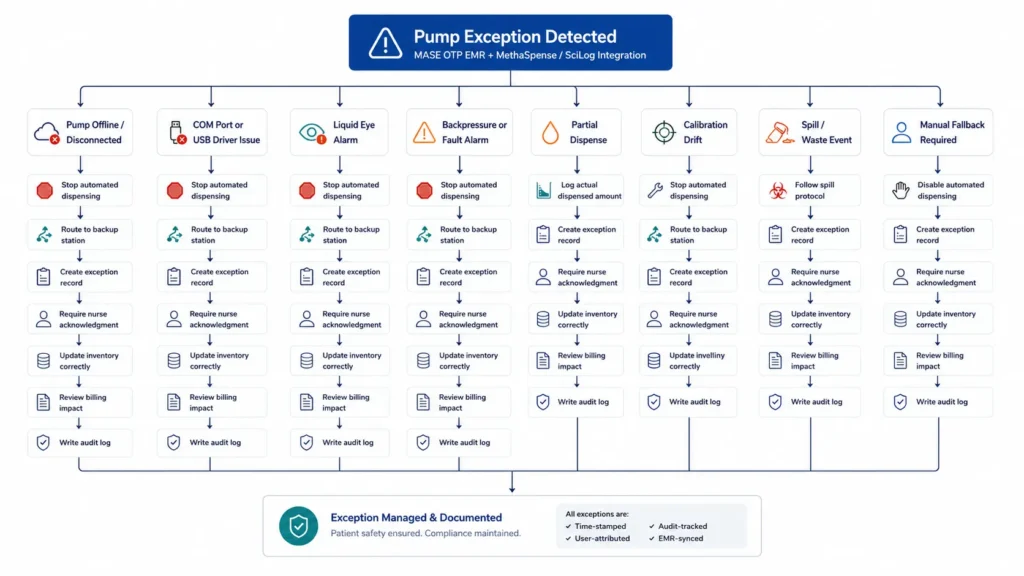
Technical note: The exception workflows described above represent best practices for OTP EMR design. Whether MASE implements each of these exactly as described should be confirmed with MASE engineering and demonstrated live before purchase.
9. What OTP Buyers Should Ask Before Choosing an EMR with Pump Integration
The real buying question is not “does the EMR say it supports pumps?” It is: “can the EMR prove a real device event came back from the pump and updated the chart, inventory, bottle record, billing workflow, and audit trail?” Any vendor can show a pump integration screen. Fewer can show a live device event.
Here is the checklist to bring into every demo.
| Question to Ask | Why It Matters | What a Strong Vendor Should Show Live |
|---|---|---|
| Does the EMR support our exact pump model and firmware? | MethaSpense and SciLog LabTec have different hardware and protocol requirements | A vendor should name your model and confirm compatibility — not just “we support IVEK and Parker” |
| Is integration native, interface-based, middleware-based, or batch-export based? | Architecture determines reliability and failure mode | Vendor should explain the data pathway from cloud to COM port; ask who owns that pathway |
| Does the pump return actual mL dispensed, or just a command confirmation? | Ordered dose and actual dose must both be stored | Ask the vendor to show the pump return payload in a real dispense event |
| What fields write back to the chart automatically? | Chart should capture actual dose, timestamp, nurse ID, pump serial, and fault codes | Ask to see a post-dispense chart note in a live demo |
| Is inventory updated in real time or through batch reporting? | Real-time update supports DEA reconciliation; batch creates lag | Ask the vendor to show the inventory ledger update after a simulated dispense |
| Does the system support take-home bottle tracking? | SAMHSA take-home standards require documented tracking | Ask whether bottles get unique IDs, callbacks are supported, and bottle returns are logged |
| What happens if the pump is offline? | This happens in production; your team needs a protocol | Ask the vendor to simulate a disconnected pump in the demo |
| What happens during a partial dose, spill, or Liquid Eye alarm? | Exception handling protects inventory and billing accuracy | Ask specifically about Liquid Eye (MethaSpense) and backpressure alarm (SciLog) workflows |
| What does billing receive after each dispense? | Weekly OTP bundle billing requires documented administration | Ask the vendor to show what the billing record looks like after a dispense event |
| Can the vendor prove this live — not with slides? | Live demo proof is the only reliable signal | If the vendor cannot demo a live pump event in a production-like workflow, treat that as a red flag |
Red flags to watch for
Phrases that should raise concern during an OTP EMR evaluation:
- “We have an open API” (requires custom development; not native integration)
- “Nurses can upload the pump log at the end of the day” (batch reconciliation, not real-time sync)
- “You’ll need to configure the COM port yourself” (workstation dependency without vendor ownership)
- “Our billing team can reconcile that manually” (removes automation value entirely)
- “We’ll handle that in implementation” when asked a specific pump workflow question in a demo
In a live demo, ask the vendor to show:
- A real or hardware-simulated MethaSpense/SciLog dispense event
- Actual mL returning to the patient chart
- Inventory decrement after dispense
- Pump offline or fault workflow
- Partial dose or spill workflow
- Take-home bottle record creation
- What billing receives after dispense
- Audit trail for the full event
10. FAQ: MethaSpense, SciLog, and Methadone Pump Integration
What is MethaSpense + SciLog integration in an OTP clinic?
It is the connection between the clinic’s dispensing hardware — IVEK MethaSpense or Parker SciLog LabTec — and the OTP EMR, so that dose orders, dispense confirmations, patient charts, inventory records, and billing documentation stay synchronized without duplicate nurse entry.
How does methadone pump integration work with an EMR?
The EMR sends a verified dose order to the pump over a local serial connection (USB or RS-232 via COM port). The pump dispenses the exact volume and sends a confirmation back to the EMR. The EMR writes the actual dispensed amount, timestamp, and nurse attribution to the patient chart and inventory ledger automatically.
Does MASE support MethaSpense and SciLog LabTec?
MASE is positioned as an OTP-native EMR with MethaSpense and SciLog LabTec integration. Whether MASE supports your specific pump model, firmware version, and deployment environment should be confirmed directly with MASE engineering and demonstrated in a live demo before purchase.
Does the integration use USB, RS-232, or COM ports?
Both MethaSpense (IVEK) and SciLog LabTec (Parker) communicate through local serial connections — RS-232 or USB-as-serial — mapped to a designated COM port on the workstation. The SciLog LabTec uses 9600 baud, 8 data bits, 1 stop bit, no flow control (8N1) per Parker documentation. MethaSpense serial settings should be confirmed with IVEK for the specific model deployed.
Do I need middleware for methadone pump integration?
That depends on the EMR’s architecture. Some platforms require a background service or connector process running on the local workstation. Others are designed to maintain a more direct device connection. Ask your EMR vendor to explain exactly how their application communicates with the pump workstation — and who supports that pathway when it fails.
Why do most EMRs fail to sync cleanly with methadone pumps?
Most cloud-based EMRs are not designed for local serial hardware control. Bridging a browser-based application to a COM-port device requires a middleware or bridge layer that can fail due to driver mismatches, COM-port reassignment, version conflicts, or service crashes — creating charting and inventory gaps at the dosing window.
What data is written back to the patient chart after dispensing?
At minimum, the chart should capture: actual volume dispensed (not just ordered dose), exact timestamp, nurse ID and signature, pump serial number, and any alarm or fault codes. Some implementations also capture bottle lot number and take-home bottle ID. Verify which fields MASE writes back in a live demo.
How does pump integration help with diversion control?
By comparing the ordered dose to the actual dispensed volume, and by linking each dispense event to the patient chart, nurse, timestamp, and inventory record, pump integration supports audit-ready documentation that can help identify unexplained discrepancies. It supports a clinic’s Diversion Control Plan but does not prevent diversion on its own.
Can the EMR track take-home bottles and callbacks?
A well-configured OTP platform should create a serialized record for each take-home bottle — linking it to the patient, dispense event, dose, and bulk bottle lot — and support callback workflows that log return status. Whether MASE includes this natively with QR/barcode label generation should be confirmed in demo.
What happens if the pump is offline or shows a fault?
The EMR should block or flag the dose, not allow the workflow to continue silently. The event should generate a timestamped exception record with pump serial, fault code, nurse ID, and any manual fallback documentation. Inventory and billing impact must be captured separately from a completed-dose event.
Does pump integration help with billing documentation?
Yes — indirectly. The confirmed dispense event creates an administration record with the timestamp, patient, actual dose, and encounter linkage that billing teams need to support weekly OTP HCPCS G-code bundle claims. Whether MASE automatically generates billing-ready documentation or exports data for billing staff review should be verified in demo. OTP billing services specializing in methadone clinic revenue cycle management can help identify gaps between what the EMR documents and what payers expect.
What should a live EMR pump integration demo show?
At minimum: patient check-in, order validation, pump command, actual dispense, pump confirmation returning to the chart, inventory decrement, and a post-dispense audit record — all in a production-like workflow using real hardware or a hardware emulator. Also ask to see a failed-pump-event workflow and a take-home bottle workflow. If the vendor cannot show these live, that is relevant information.
Conclusion
Pump integration is not a checkbox. In an OTP clinic running 200 patients before 9:00 AM against a Schedule II inventory and a DEA audit trail, pump integration is the operational backbone of every clinical, compliance, and billing workflow.
A well-built OTP-native EMR does not treat MethaSpense or SciLog LabTec as peripheral hardware. It makes the pump a connected node in the clinical record — so the dose order, the physical pour, the patient chart, the inventory ledger, the take-home bottle record, and the billing documentation are all generated from one workflow event, not from four separate manual steps compared at the end of the day.
Hold vendors accountable to that standard. Ask them to show the actual device event — not the screen. Ask what happens when the pump fails. Ask who owns the data pathway. Review your current billing documentation against what your dispensing records actually show — a free OTP billing audit can surface billing gaps quickly.
If you are comparing platforms, the best OTP EMR software guide for 2026 covers how MASE compares against AZZLY Rize, Kipu, Behave Health, and others across OTP-specific criteria — including pump integration, compliance architecture, and billing workflow. You can also review methadone clinic software pricing to understand total cost of ownership, including implementation, training, and reconciliation labor.