Quick Definition: Cloud dispatch software for NEMT is a web-based platform that helps non-emergency medical transportation providers schedule trips, assign drivers, track vehicles, manage trip documentation, and monitor dispatch operations from any internet-connected device. Unlike installed software, cloud-based NEMT systems do not require local servers and can support dispatchers, drivers, owners, and billing teams in real time.
If you run a non-emergency medical transportation business, you already know the daily reality. A dispatcher juggling spreadsheets, a driver calling in to confirm an address, a billing assistant waiting on yesterday’s manifests, and an owner trying to make sense of which trips actually got paid. Cloud dispatch software is what most NEMT operators use to pull all of this into one connected workflow without depending on a single office computer.
This guide walks through what cloud-based NEMT dispatch software actually does, how it compares to installed systems, the features that matter most, what it typically costs in 2026, and how to evaluate platforms before you commit. Along the way, you’ll see where Elite Route Dispatch fits, especially for small and growing fleets that want dispatch and billing connected without enterprise overhead.
In this guide, we use terms like cloud dispatch software NEMT, cloud based NEMT software, web based NEMT dispatch, SaaS NEMT software, online NEMT dispatch, NEMT dispatch web app, and cloud NEMT operations platform to describe the same core idea: a secure online dispatch system built for non-emergency medical transportation operations.
Who this guide is for:
This guide is for NEMT owners, dispatchers, billing teams, and startup operators comparing cloud-based dispatch software. It is especially useful if you currently use spreadsheets, paper manifests, phone calls, or an older installed dispatch system and want a web-based platform with driver mobile access, trip documentation, and billing visibility.
Cloud Dispatch Software NEMT: What It Means for Providers?
Cloud dispatch software for NEMT lets providers manage trip scheduling, dispatch, GPS tracking, driver communication, billing documentation, and reporting from a browser-based platform instead of installed desktop software. The defining feature is access: dispatchers, drivers, billing teams, and owners can all log in from different devices and locations and still see the same live information.
If you’ve been running your NEMT business with spreadsheets, group texts, paper manifests, and a whiteboard, this is the category of tool that replaces all of those at once.
How cloud-based NEMT software works
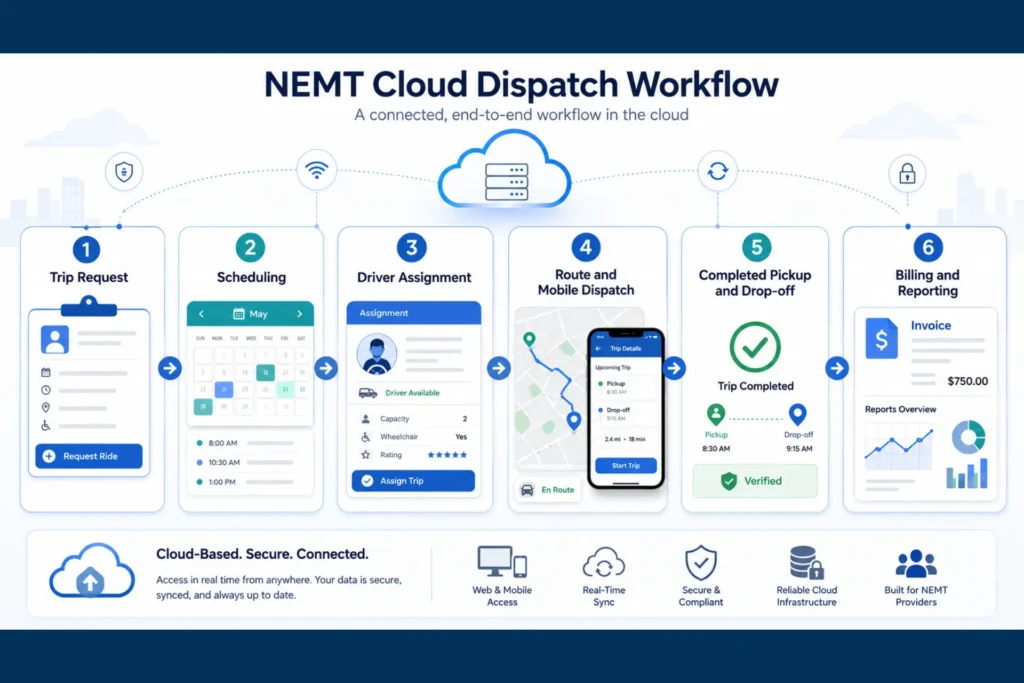
A trip request comes in — from a Medicaid broker, a facility, or a private-pay rider. It enters the dispatch dashboard. The dispatcher assigns it based on vehicle type, driver availability, mobility needs, and location. The trip flows to the assigned driver’s mobile app with the patient’s pickup time, address, drop-off destination, and any special notes like wheelchair access or oxygen.
The driver completes the trip, capturing pickup and drop-off timestamps, a GPS-verified route, and a signature for proof of service. That completed trip data then flows into the billing workflow, where it becomes the basis for a Medicaid claim, broker submission, or private-pay invoice.
Everything from the request to the invoice lives in one connected system. No re-typing into a billing spreadsheet. No lost paper manifests. No “did this trip actually happen?” debates with brokers.
What dispatchers manage from a browser dashboard
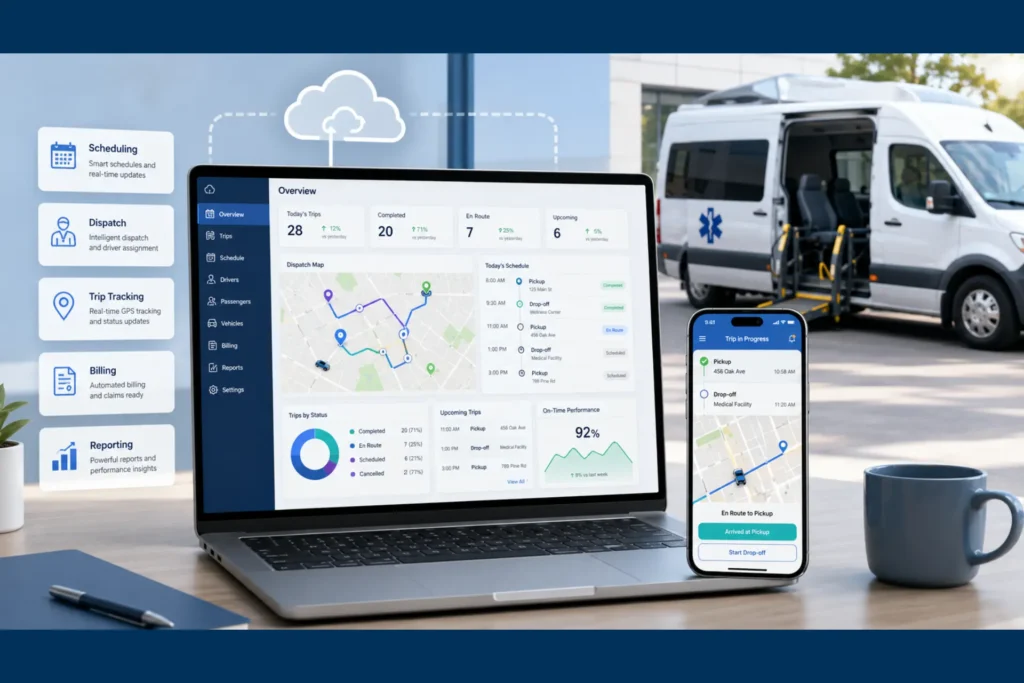
Dispatchers spend their day inside the web dashboard. From a single screen, a dispatcher can view all trips for the day, see live vehicle locations on a map, drag trips between drivers, handle same-day cancellations, watch for late pickups, and reassign rides when a driver calls out. They can also pull recurring dialysis schedules, manage will-call returns, and respond to broker changes without picking up the phone for every update.
Because the dashboard is browser-based, the dispatcher doesn’t need to be in the office. Many small NEMT owners dispatch from home, from a parked vehicle, or from a laptop at a clinic.
What drivers access from a mobile device
Drivers use a mobile app or mobile-friendly web view. Their workflow is different — simpler and more focused. They see today’s manifest, get turn-by-turn navigation to the next pickup, mark themselves en route, capture a passenger signature, record arrival timestamps, and flag no-shows or cancellations as they happen.
The good driver apps are built around one-tap actions. A driver shouldn’t be filling out forms in a parking lot. They should be tapping “arrived,” “picked up,” “dropped off,” and moving on.
Why cloud access matters for NEMT operations
NEMT operations change by the minute. Riders cancel. Hospitals discharge patients earlier or later than expected. A dialysis facility calls about a patient who finished treatment 20 minutes early. A driver gets stuck in traffic. With a cloud platform, the dispatcher sees these changes in real time, the driver gets the update on their phone, and the billing team sees the completed-trip record without waiting for paper to arrive at the office.
This is the difference between reactive dispatching and a connected operation. For more on which platforms lead this category, see our guide to the best NEMT software.
Cloud vs Installed NEMT Dispatch Software
Short answer: Cloud NEMT dispatch software is usually better for small and growing fleets because it avoids local servers, supports mobile driver access, updates automatically, and lets dispatchers manage trips from any browser. Installed software may only make sense for large organizations with custom IT or security requirements.
Cloud-based NEMT dispatch software explained
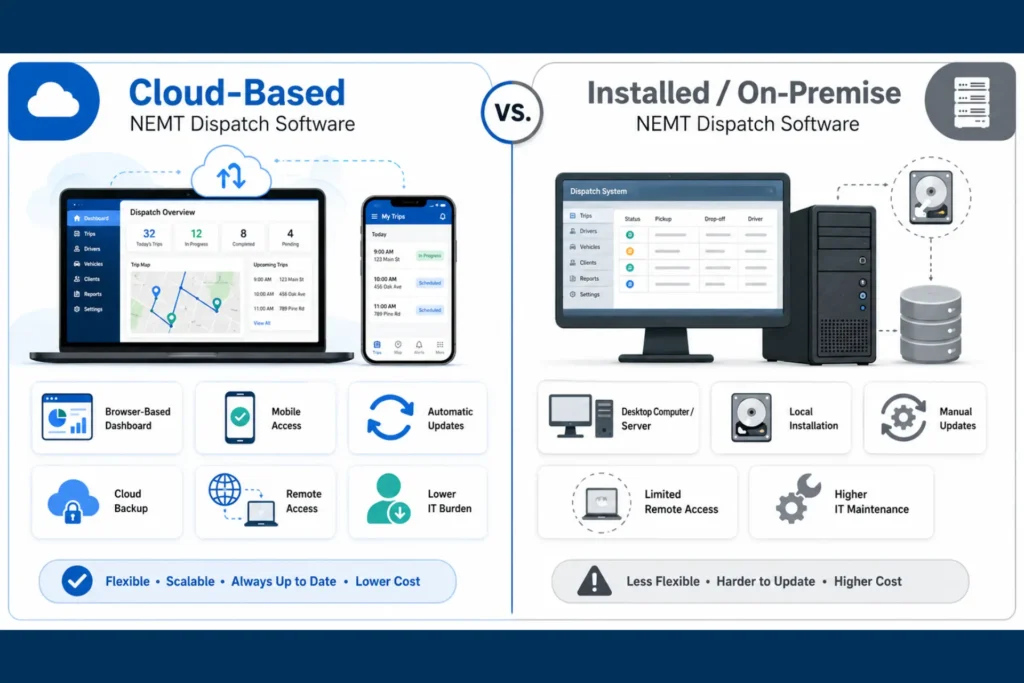
Cloud, sometimes called SaaS or web-based, means the software lives on the vendor’s servers and you access it through a browser or mobile app. You pay a monthly or annual subscription. The vendor handles updates, backups, security patches, and uptime. You don’t buy hardware, you don’t run a server, and you don’t pay an IT contractor to install anything on local machines.
Dispatchers, drivers, billing staff, and owners all log in with their own credentials. Everyone sees a synced view of the operation — the dispatch board, vehicle locations, trip statuses, and completed records — at the same time.
Installed or on-premise dispatch software explained
Installed software, sometimes called on-premise, lives on a computer or local server inside your office. You typically pay an upfront license fee plus ongoing maintenance. Updates are manual. If you want remote access, you usually need a VPN, remote desktop setup, or a special module. Backups, security patches, and hardware failures are your responsibility.
For NEMT, this often shows up as an older system tied to a single office PC, where the dispatcher has to be physically at that machine to make changes. If the computer crashes, dispatch stalls.
Cloud vs installed comparison table
| Comparison | Cloud / SaaS | Installed / On-Premise |
|---|---|---|
| Upfront cost | Low — subscription only | High — license + server hardware |
| Implementation time | Days to a few weeks | Often weeks or months |
| Software updates | Automatic | Manual installs |
| IT maintenance | Handled by vendor | Owner responsibility |
| Remote access | Native browser/mobile | Requires VPN or remote desktop |
| Driver mobile app | Built-in, real-time | Limited or add-on |
| Backups | Automated cloud backups | Manual or separate setup |
| Disaster recovery | Vendor redundancy and failover | Local-only unless added |
| HIPAA responsibility | Shared with vendor under BAA | Almost entirely on the owner |
| Scalability | Add users or vehicles in minutes | Hardware and license upgrades |
| Offline access | App-dependent (varies by vendor) | Local-only by default |
| Data backup | Continuous and redundant | Often manual or external |
Which option is better for small NEMT fleets?
For most fleets between 1 and 25 vehicles, cloud is the practical choice. You don’t have to buy a server, you don’t have to maintain it, and you don’t have to staff IT. You also get a driver mobile app out of the box, which is non-negotiable in modern NEMT operations.
Cloud also removes a quiet but real risk: the office computer as a single point of failure. If your only dispatch tool runs on a desktop in the back office and that machine dies on a Monday morning, your operation pauses. With cloud, your dispatcher logs in from another device and keeps working.
When installed software may still make sense
There are cases where installed software still fits. Very large operations with full IT departments, custom integrations to legacy hospital or transit systems, or organizations with strict offline requirements may have reasons to run on-premise. Some providers in remote areas with unreliable internet may also prefer a hybrid setup. These are exceptions, not the rule, and they typically apply to enterprise-scale operations rather than independent NEMT businesses.
Benefits of Cloud-Based NEMT Dispatch Software
The benefits of cloud dispatch are easier to understand when you look at them by role. The same platform helps the owner, the dispatcher, the driver, the billing team, and the patient or facility in different ways.
Real-time access from any location
The owner can check fleet performance from a phone at home. The dispatcher can manage a route change from a coffee shop. The billing assistant can pull a trip record from a different office. Drivers see new trips and updates the moment they’re assigned. Cloud access removes the geographic constraint that ties NEMT operations to one physical computer.
Better driver and dispatcher communication
Most NEMT operators have lived through the “where are you?” loop — calling drivers, waiting for callbacks, texting addresses, and trying to reconcile what actually happened at the end of the day. With a cloud platform, dispatchers see live driver status: en route, arrived, picked up, dropped off. Drivers receive trip changes as push notifications instead of phone calls. Cancellations, will-call returns, and reassignments happen in seconds rather than minutes.
No server or IT maintenance
You don’t buy a server. You don’t run backups manually. You don’t pay an IT contractor to come patch software. The vendor handles all of that. For a small NEMT business, this can be the difference between spending evenings on operations or spending evenings on infrastructure.
Automatic software updates
When the vendor improves the platform, adds a feature, or patches a security issue, every user gets the update on their next login. There’s no install process, no version mismatch between dispatcher and billing staff, and no “we’re still on the old version” problem.
Cloud backup and disaster recovery
Trip records, billing data, signatures, and GPS logs are continuously backed up by the vendor. If a phone is lost, a laptop is stolen, or the office floods, the data is still safe. This is harder to achieve with installed software unless you’ve already invested in a separate backup system.
Scalability as your fleet grows
Adding a new driver doesn’t mean buying another seat license, installing software on a new tablet, or coordinating with IT. You add the driver in the dashboard, send them the app, and they’re working. The same applies when you grow from 5 vehicles to 15 — the platform scales with a few clicks rather than a project.
Better billing and reporting visibility
Because dispatch data flows directly into billing records, owners can see revenue trends, payer mix, on-time performance, no-show patterns, and profit per mile in dashboards rather than in end-of-month spreadsheets. For Medicaid-heavy operations, this can shorten the gap between completed trips and submitted claims significantly. If you’re new to NEMT billing or want a deeper breakdown of the revenue cycle, our NEMT billing guide walks through the full workflow.
Must-Have Features in a Cloud NEMT Dispatch System
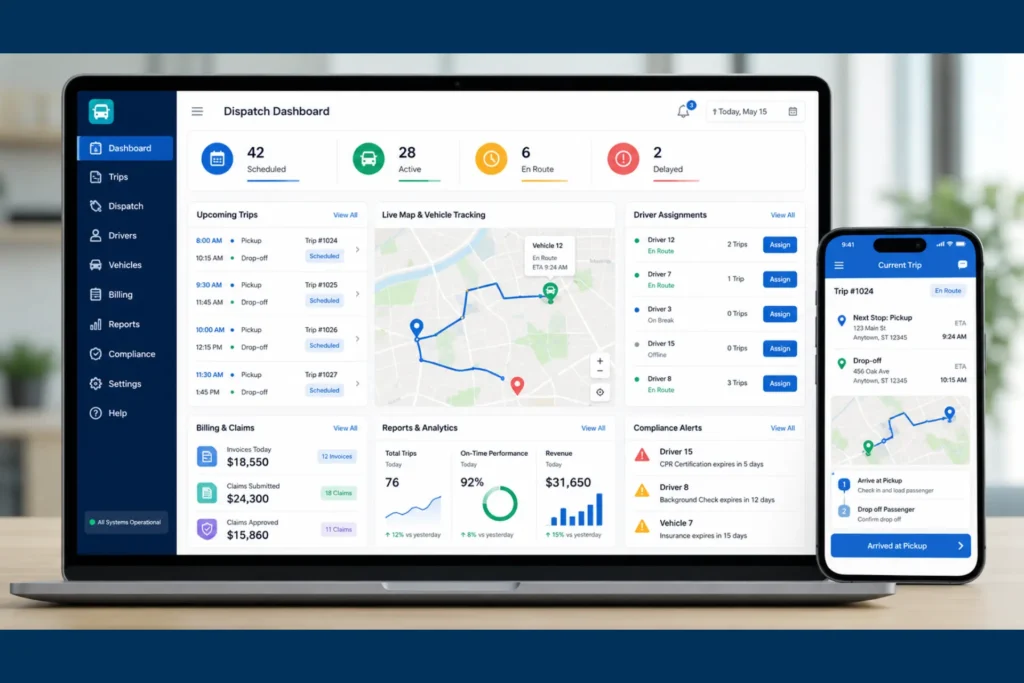
Not all cloud NEMT software is built the same. Some platforms are dispatch-only and leave billing entirely on you. Others bundle dispatch, EVV-style documentation, and claims into one workflow. Below are the features you should expect to see — and test — before signing.
Trip scheduling and dispatch dashboard
The dashboard is your command center. It should show today’s trips, unassigned rides, vehicle locations on a live map, driver status, and any flagged issues like late pickups or pending cancellations. Look for drag-and-drop assignment, recurring trip support for dialysis and therapy patients, and an easy way to handle will-call returns.
Driver assignment and route visibility
The platform should suggest the best driver for each trip based on proximity, vehicle type, and availability — and let the dispatcher override when needed. Live GPS tracking, ETAs, and breadcrumb trails should be standard, not premium add-ons.
Driver mobile app
This is one of the highest-impact features and one of the easiest to under-test. Ask to see the app in action: how does a driver mark a trip in progress, capture a signature, log a no-show, or handle a passenger who isn’t ready? What happens when the driver loses signal in a hospital parking garage? Does the app capture the data and sync later, or does it fail?
A weak driver app is the fastest way to undermine a strong dashboard.
Fleet and credential management
Driver licenses, CPR certifications, vehicle insurance, inspections, and registrations all expire. A good platform tracks these and sends alerts well before expiration. Some systems can even block dispatching a driver or vehicle once a credential lapses, which protects you during audits. For a deeper look at what auditors check, see our NEMT compliance checklist.
Billing and claims management
This is where many platforms quietly underperform. Some offer trip exports to a spreadsheet and call it billing. Others generate 837P claims, support CMS-1500 workflows, integrate with broker portals, and track denials. If billing matters to your revenue cycle, ask vendors to walk you through a completed trip turning into a submitted claim — not a slide about it. For complex Medicaid and broker workflows, many small fleets choose to pair dispatch software with dedicated NEMT billing services rather than handle every claim in-house.
Reporting and analytics
Owners need dashboards that show revenue per payer, payer mix, on-time performance, trip volume trends, no-show rates, and profit per mile. The reports should export easily for accountants, brokers, or audit preparation.
EVV-style trip verification
Pickup and drop-off timestamps, GPS-verified location data, and electronic signatures form the backbone of audit-ready trip records. EVV rules vary by service type and state program, and the federal EVV mandate specifically applies to Medicaid personal care services and home health care services requiring in-home visits. For NEMT, use “EVV-style trip verification” to describe GPS timestamps, mileage, signatures, and pickup/drop-off documentation unless your state or payer specifically requires EVV for transportation. The federal background is summarized on the CMS EVV page.
User permissions and audit logs
Different roles need different views. Drivers should see only their assigned trips. Dispatchers see operations. Billing sees claims data. Owners see everything. Behind all of that, audit logs should record who viewed, edited, or exported any record — essential during Medicaid audits.
Top Cloud NEMT Dispatch Platforms to Compare in 2026
This is a cloud-specific shortlist, not a full ranking. For a deeper feature-by-feature comparison, see our guide to the best NEMT software. The table below focuses on cloud architecture, pricing model, setup profile, and best fit.
| Platform | Cloud-Based? | Pricing Model | Setup Profile | Best Fit |
|---|---|---|---|---|
| Elite Route Dispatch | Yes — web-based SaaS | Subscription, tiered | Fast, small-fleet friendly | Small to mid fleets wanting dispatch + billing |
| NEMT Cloud Dispatch | Yes | Subscription per fleet tier | Moderate | Budget-conscious small fleets |
| RouteGenie | Yes | Per-vehicle subscription | Moderate | Routing/automation-focused operators |
| Bambi | Yes | Per-vehicle subscription | Quick onboarding | Tech-forward, automation-leaning fleets |
| Tobi Cloud | Yes | Tiered subscription | Moderate | Modern UX, mid-market |
| MediRoutes | Yes | Custom/tiered | Moderate to longer | Established providers, broker-heavy ops |
| AngelTrack | Yes | Tiered subscription | Moderate | Mixed NEMT/EMS operations |
| TripMaster / Momentm | Yes | Custom quote | Longer onboarding | Larger fleets and MCO-style operations |
Platform summaries
Elite Route Dispatch is the best fit for small and growing fleets that want cloud dispatch, fleet management, billing, claims, reporting, and mobile-friendly access in one affordable workflow. Pricing starts at $125/month for up to 5 vehicles with a per-driver add-on, which makes it one of the lower-friction billing-connected options for owner-operators and 3–15 vehicle fleets.
NEMT Cloud Dispatch is a good fit for operators looking for a cloud-based transportation platform with transparent small-fleet pricing and broker-related workflows. It’s commonly considered alongside Elite Route Dispatch by budget-conscious buyers.
RouteGenie is a stronger fit for operators focused on route optimization, automation, and established dispatch workflows. It tends to appeal to providers whose biggest pain is routing efficiency rather than billing.
Bambi is a good fit for teams that want a modern, automation-heavy driver and dispatcher experience. The product is positioned around AI-assisted scheduling and fast onboarding.
Tobi Cloud is a strong fit for NEMT operators that want cloud dispatch, broker workflow support, and a clean user experience. It’s a frequent shortlist option for mid-market operators.
MediRoutes is better suited for established NEMT providers with more complex billing, broker, and operational needs. It tends to fit larger operations with multiple service lines.
AngelTrack is the best fit when a provider needs EMS-style dispatch workflows or mixed NEMT/EMS operations. Pure NEMT operators sometimes find it more complex than they need.
TripMaster / Momentm is better suited for larger fleets, paratransit-style operations, and enterprise transportation programs. Onboarding is longer and pricing is typically quote-based.
For operators who want a cloud-first platform without enterprise-level setup, Elite Route Dispatch belongs in the comparison alongside larger names. It’s positioned for small to mid fleets that need browser-based dispatch, billing visibility, and low IT overhead in a single workflow.
How Much Does Cloud NEMT Dispatch Software Cost?
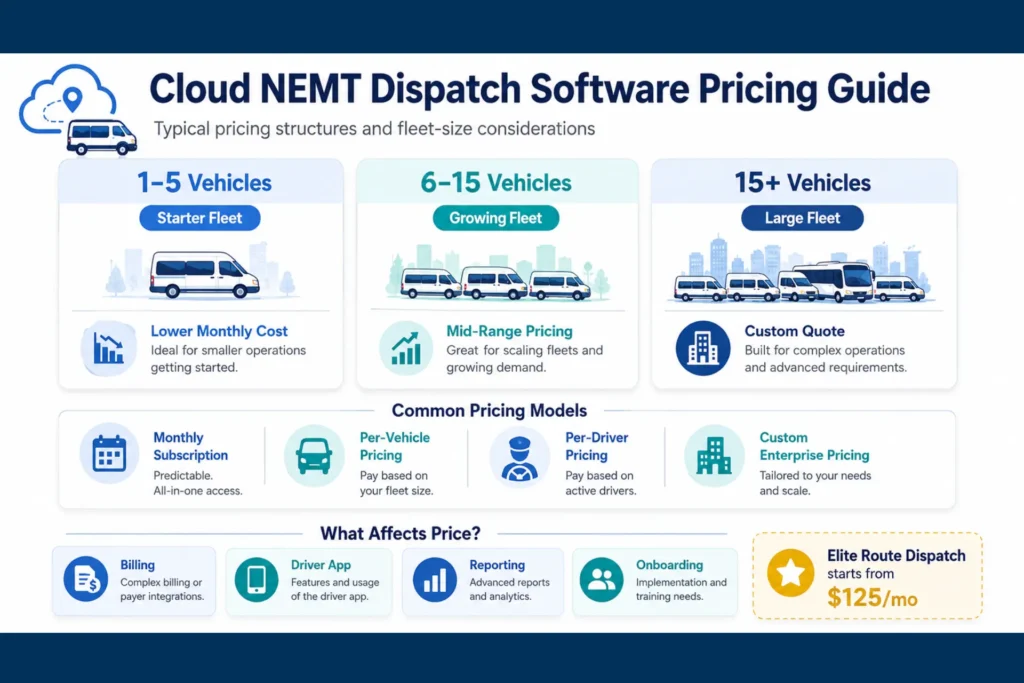
For small fleets, cloud NEMT dispatch software often starts as a monthly subscription. The real cost depends on vehicles, drivers, billing features, broker integrations, training, support, and whether claims management is built in or sold separately. Elite Route Dispatch starts at $125/month for up to 5 vehicles, which makes it one of the more affordable billing-connected options for small NEMT fleets.
Monthly subscription pricing
Most cloud NEMT platforms use one of four pricing models: per vehicle, per driver, per trip, or tiered plans. Per-vehicle is the most common and predictable. Per-trip can be cheaper for low-volume fleets but riskier as you grow because costs scale with every ride. Tiered plans usually bundle a fleet-size limit with included features.
Per-vehicle and per-driver pricing
A common model charges a base fee covering a small number of vehicles, then adds incremental cost for each additional driver or vehicle. This is friendly to small fleets because the entry point is low and growth is predictable.
Setup, training, and hidden costs
This is where the real budget gets decided. Look for:
- Implementation or onboarding fees
- Data migration charges (especially when switching from spreadsheets or legacy software)
- Driver app seat licenses
- SMS notification overages for patient ETA texts
- Broker integration or API connection fees
- Per-claim or clearinghouse fees if billing is included
- Training caps and support tier limits
A platform priced at $50/vehicle that adds $500 for setup, $200 for training, and $0.10 per SMS can quickly cost more than a higher-sticker-price platform with everything included.
Cost comparison by fleet size
| Fleet Size | Typical Monthly Range* | Common Pricing Model | Notes |
|---|---|---|---|
| 1–5 vehicles | Lower-tier subscription | Flat or per-vehicle | Watch for setup fees |
| 6–15 vehicles | Mid-tier subscription | Per-vehicle or tiered | Billing add-ons matter most |
| 16–30 vehicles | Higher-tier subscription | Per-vehicle, volume discounts | Broker integrations critical |
| 30+ vehicles | Custom quote | Enterprise, tiered with SLA | Implementation timeline grows |
*Ranges vary significantly by vendor and feature set. Always verify current pricing on vendor pricing pages before budgeting.
Cloud NEMT Dispatch Software Pricing Examples
| Platform | Public Pricing Style | Small-Fleet Fit | Billing/Claims Included? | Notes |
|---|---|---|---|---|
| Elite Route Dispatch | From $125/month for up to 5 vehicles | Strong | Yes | Best fit for small fleets that want dispatch + billing |
| NEMT Cloud Dispatch | Tiered monthly plans | Strong | Yes / varies | Known for transparent small-fleet pricing |
| Bambi | Per-vehicle pricing | Good | Varies | Strong automation and driver workflow |
| Tobi Cloud | Per-vehicle / tiered pricing | Good | Yes / varies | Modern cloud dispatch and broker workflows |
| RouteGenie | Per-vehicle / custom depending on plan | Mid-market | Yes / varies | Strong routing and dispatch automation |
| MediRoutes | Custom / quote-based | Mid to large fleets | Strong | Better for established broker-heavy operations |
Verify current pricing on each vendor’s pricing page before final budgeting. Vendor plans, tiers, and bundled features change throughout the year.
Need cloud NEMT dispatch software with billing included?
Elite Route Dispatch helps small and growing NEMT fleets manage dispatch, drivers, fleet credentials, billing, claims, reporting, and mobile workflows from one cloud platform starting at $125/month for up to 5 vehicles.
Is Cloud NEMT Software Secure and HIPAA-Compliant?
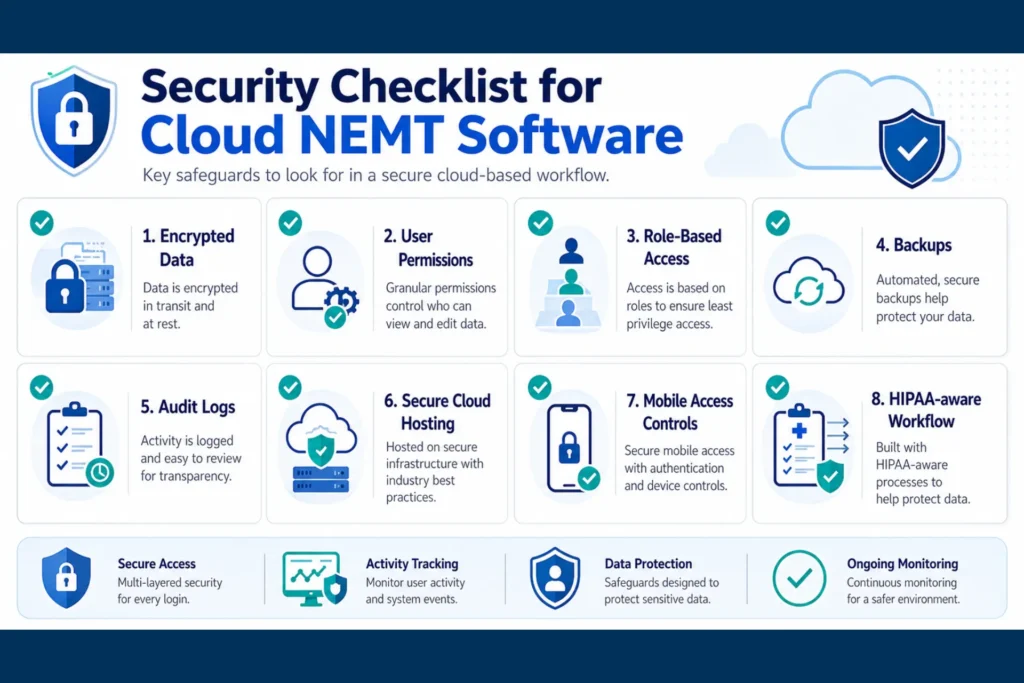
Short answer: Cloud NEMT software can support HIPAA compliance when the vendor signs a Business Associate Agreement and provides safeguards such as encryption, access controls, audit logs, and secure hosting. Compliance is not automatic — it depends on both the software and how your team uses it.
Why NEMT trip data can include PHI
People often think of NEMT records as logistics data, not health data. That's not how HIPAA sees it. A patient name combined with a pickup address, a clinic destination, an appointment time, and a mobility note can constitute Protected Health Information. Add a Medicaid ID, GPS breadcrumbs, and an electronic signature, and you're firmly in PHI territory.
This means your dispatch software is handling PHI every time a trip is created, viewed, or completed.
HIPAA and cloud software responsibilities
HIPAA places shared responsibility on both the covered entity (your NEMT business) and the business associate (the software vendor). The vendor is responsible for technical safeguards, secure hosting, and contractual protections. You're responsible for staff training, access policies, secure use of the software, and incident response. Neither side can outsource compliance to the other.
HHS guidance also states that covered entities and business associates may use cloud service providers to store or process ePHI if they enter into a HIPAA-compliant Business Associate Agreement and otherwise comply with HIPAA Rules. The U.S. Department of Health and Human Services HIPAA Security Rule outlines the administrative, physical, and technical safeguards that apply, and HHS specifically explains that cloud service providers can have HIPAA obligations when they create, receive, maintain, or transmit ePHI for covered entities or business associates.
What a Business Associate Agreement means
A Business Associate Agreement, or BAA, is a contract between your business and the software vendor that handles your patient data. It defines how the vendor must protect PHI, report breaches, and support your compliance obligations. If a vendor cannot or will not sign a BAA, that's a clear signal to look elsewhere.
User permissions, encryption, backups, and audit logs
A HIPAA-aligned cloud NEMT platform should include encryption at rest and in transit, multi-factor authentication for staff logins, role-based access so drivers see only their assigned trips, automatic session timeouts, audit logs that record who did what, automated backups, and documented breach response procedures.
The Minimum Necessary principle applies here: drivers should see only the information needed to complete their trips, billing staff should see only what they need to file claims, and full system access should be limited to admin roles.
Security questions to ask before buying
Before signing, ask vendors:
- Will you sign a BAA?
- How is data encrypted at rest and in transit?
- Is PHI stored locally on the driver's phone, or only inside an encrypted app session?
- Can I revoke a driver's access immediately if their phone is lost?
- Do audit logs show who viewed, edited, or exported records?
- Can audit logs be exported for a Medicaid audit?
- What is your breach notification process?
- What happens to my data if I cancel?
If a vendor's answers are vague or marketing-flavored, treat that as a yellow flag.
Best Cloud Dispatch Software for Small NEMT Fleets
The best cloud dispatch software for small NEMT fleets is not the largest or most complex platform. It's the one that helps a 1–10 vehicle operator replace spreadsheets, phone calls, paper manifests, and disconnected billing with a single cloud workflow they can manage from a phone or laptop.
What small fleets actually need
Small-fleet operators don't need 200 features. They need:
- Mobile-first access for the working owner who dispatches, drives, and bills
- Real-time driver sync that replaces the "where are you?" loop
- Digital trip manifests with signature capture and timestamps
- Basic GPS tracking and ETAs
- Credential alerts so a license or insurance renewal doesn't catch them off guard
- Billing or claims support that turns completed trips into payable records
- Transparent pricing without surprise add-ons
Why enterprise systems can be too much
Large enterprise platforms are built around custom integrations, dedicated success managers, complex permissioning, and quote-only pricing. For an owner-operator running five wheelchair vans, that complexity is a tax. The implementation alone can stall the business for weeks. Most small fleets don't need enterprise — they need professional, simple, and affordable.
Small fleet vs enterprise: priorities at a glance
| Need | Small Fleet Priority | Enterprise Priority |
|---|---|---|
| Pricing | Predictable monthly cost | Custom contracts |
| Setup | Fast onboarding | Implementation project |
| Features | Dispatch, driver app, billing, reporting | API, custom workflows, SLAs |
| Support | Practical help and training | Dedicated account team |
| Billing | Built-in or easy to manage | Complex payer integrations |
| Best fit | 1–15 vehicles | 30+ vehicles |
Why Elite Route Dispatch fits small and growing fleets
Elite Route Dispatch is positioned as the bridge between spreadsheets and enterprise suites. It's a browser-based cloud dispatch platform built for small and growing fleets that want dispatch, billing, reporting, and credential tracking in one subscription. The pricing is structured around predictable monthly overhead rather than à la carte modules, which makes budgeting straightforward for operators in the 1–15 vehicle range.
For NEMT owners who are switching from manual operations and want professional dispatch without an enterprise project, this is where it lands.
When larger platforms make sense
If you operate 30+ vehicles, run multiple service lines including EMS or paratransit contracts, integrate with multiple state Medicaid systems, or need custom workflows for managed care organizations, a larger enterprise platform may be a better fit. The trade-off is longer onboarding, higher cost, and more complexity.
How to Get Started With Cloud NEMT Dispatch Software
Switching to cloud dispatch should follow a phased process: audit your current workflow, clean your data, shortlist vendors, run real-world demos, configure billing and broker workflows, train drivers, pilot the system, and then go live in stages.
Audit your current dispatch workflow
Before evaluating any software, map your current operation. What's your payer mix — Medicaid, brokers, private pay, facility contracts? Where are your bottlenecks — denied claims, dispatcher burnout, missed trips, late billing? How many recurring trips do you handle each week? How often do credentials expire and slip through?
This audit tells you what features actually matter and prevents you from buying software that simply digitizes a broken process.
NEMT Cloud Dispatch Go-Live Checklist
A step-by-step checklist to move from spreadsheets or legacy software to a cloud NEMT dispatch platform without disrupting service. Check off as you complete each item, then download a clean copy for your team.
Phase 1: Internal Audit
Phase 2: Data Cleanup
Phase 3: Vendor Evaluation
Phase 4: Demo Testing
Phase 5: Setup & Configuration
Phase 6: Training & Pilot
Phase 7: Go-Live
List your required features and budget
Once you know your bottlenecks, list the must-have features. For most small fleets, this includes a driver mobile app, real-time GPS, recurring trip support, credential alerts, EVV-style logs, billing or claims integration, and HIPAA-aligned security. Set a realistic monthly budget that includes setup, training, and likely add-ons — not just the sticker price.
Compare pricing and onboarding
Shortlist two or three platforms that match your fleet size and feature priorities. Compare not just the monthly fee, but onboarding time, data migration support, training included, broker integration setup, and what happens during the first 90 days.
Ask security and billing questions during demos
Don't accept a slide-deck demo. Ask the vendor to show:
- A will-call return added to a live route mid-day
- A recurring dialysis trip scheduled three days a week
- A driver app working in offline mode and syncing when signal returns
- A signature captured and a GPS-verified timestamp logged
- A completed trip flowing into a billing workflow or claim
Also ask about BAA availability, data export at cancellation, and hidden fees.
Test the driver workflow before switching
Drivers make or break adoption. Before going live, give one or two of your most adaptable drivers access to the app and run a few real trips through it. If the app is confusing or slow, you'll see it immediately. Better to find that during a pilot than during a Monday morning rush.
Book a demo before committing
The best demos are workflow-focused, not feature-focused. Bring a real scenario — your busiest day, a problematic broker, a tricky recurring patient — and ask the vendor to show how the platform handles it. If you're considering Elite Route Dispatch, the walkthrough is built around your actual fleet rather than a generic tour.
For more on what to expect during the first 90 days of a new operation, see our guide on how to start an NEMT business and our breakdown of NEMT startup costs.
Frequently Asked Questions
What is cloud dispatch software for NEMT?
Cloud dispatch software for NEMT is a web-based platform that helps non-emergency medical transportation providers manage trip scheduling, dispatching, routing, driver communication, GPS tracking, and billing through the internet instead of a local office server or installed desktop system.
How is cloud-based NEMT dispatch different from installed software?
Cloud-based NEMT dispatch runs through a browser or mobile app, while installed software lives on a local office computer or server. Cloud systems usually offer remote access, automatic updates, real-time driver syncing, and lower IT maintenance, while installed systems require more local hardware and manual upkeep.
What are the main benefits of cloud-based NEMT software?
The main benefits are real-time GPS tracking, remote dispatcher access, instant driver manifest updates, mobile app workflows, automated billing handoffs, cloud backups, and reduced dependence on office computers. For NEMT providers, this can mean fewer phone calls, cleaner trip records, and faster visibility into daily operations.
What features should cloud NEMT dispatch software include?
A strong cloud NEMT dispatch system should include real-time GPS tracking, automated scheduling, a driver mobile app, digital manifests, electronic signatures, pickup and drop-off timestamps, route optimization, billing or claims support, credential alerts, reporting dashboards, audit logs, and HIPAA-aligned security controls.
Does NEMT software work on mobile phones?
Yes. Most modern cloud NEMT platforms include a driver mobile app or mobile-friendly web portal. Drivers can view digital trip manifests, follow navigation, update trip status, capture signatures, record timestamps, and sync GPS data, reducing phone calls and paper-based trip management.
Does cloud NEMT software include billing and claims?
Some cloud NEMT platforms include built-in billing and claims workflows, while others only export trip data to a separate billing system. Buyers should ask whether the software supports 837P, CMS-1500, Medicaid broker workflows, denial tracking, and completed-trip-to-claim automation before choosing a platform. For a deeper look, see our NEMT billing guide.
Is cloud NEMT dispatch software HIPAA-compliant?
Cloud NEMT dispatch software can support HIPAA compliance if the vendor protects PHI with encryption, role-based access, audit logs, secure hosting, and a signed Business Associate Agreement. Compliance is not automatic; NEMT providers still need proper staff training, access policies, and internal procedures.
What is a BAA for NEMT software?
A Business Associate Agreement, or BAA, is a HIPAA-related contract between your NEMT business and a software vendor that handles protected health information. It outlines how the vendor must safeguard patient data, report breaches, and support your organization's HIPAA compliance responsibilities.
How much does cloud NEMT dispatch software cost?
Cloud NEMT dispatch software is usually priced as a monthly SaaS subscription based on vehicles, drivers, trips, or feature tiers. Small fleets may see lower entry-level plans like Elite Route Dispatch starting at $125/month for up to 5 vehicles, while larger fleets often need custom pricing. Buyers should check for setup fees, billing add-ons, driver app seats, and per-trip charges.
Is cloud dispatch software a good fit for small NEMT fleets?
Yes. Cloud dispatch software is often a good fit for small NEMT fleets because it avoids server maintenance, supports remote access, and can scale as the business grows. The best options for 1–10 vehicle fleets prioritize simple setup, transparent pricing, mobile access, and billing-connected workflows.
How long does it take to switch from paper or spreadsheets to cloud dispatching?
Basic setup may take only a few days for a small fleet, but a smooth transition usually requires data cleanup, driver training, billing setup, and workflow testing. Most providers should plan a phased rollout using recurring trips, driver credentials, and one broker or facility first.
What questions should I ask during a cloud NEMT software demo?
Ask the vendor to show a real trip from scheduling to dispatch, driver app completion, signature capture, GPS timestamping, billing, and reporting. Also ask about BAA availability, data export, offline mode, broker integrations, setup fees, training, support, and whether billing is built in or an add-on.
What happens if my internet goes out?
Most cloud platforms continue functioning on the driver app side through offline mode, capturing trip data and syncing when signal returns. The dispatch dashboard requires internet access. For rural operations, ask vendors specifically how their app handles dead zones — answers vary significantly by platform.
Can drivers use personal phones for the dispatch app?
Yes, in most cases. The key is that the app should keep PHI inside an encrypted session rather than storing trip data in the phone's photo gallery or local files. Ask vendors how they handle lost phones, remote access revocation, and session timeouts.
Bringing It Together
Cloud dispatch software has become the operating system of modern NEMT. It's how small fleets professionalize, how growing fleets scale, and how established providers stay competitive on Medicaid contracts and broker networks. The right platform connects dispatch, drivers, billing, and compliance into one workflow that can be managed from anywhere — without a server, without a dedicated IT staff, and without the constant friction of paper, phone calls, and disconnected spreadsheets.
For small and growing fleets, Elite Route Dispatch is a practical entry point: cloud-based, billing-connected, mobile-friendly, and priced from $125/month for up to 5 vehicles. Whether you're moving from manual operations or evaluating a switch from a legacy system, the next step is the same — see how your fleet would actually run inside the platform before you commit. Pairing the platform with experienced NEMT billing services is also an option for owners who want the dispatch and revenue cycle handled together.