
Quick Definition NEMT scheduling software is a specialized platform that helps non-emergency medical transportation providers book trips, build daily schedules, assign drivers and vehicles, handle recurring appointments, manage cancellations and will-calls, and prepare completed trips for dispatch, documentation, billing, and claims. Unlike a basic calendar, it accounts for mobility needs, appointment windows, broker imports, and the proof of service required to get paid.
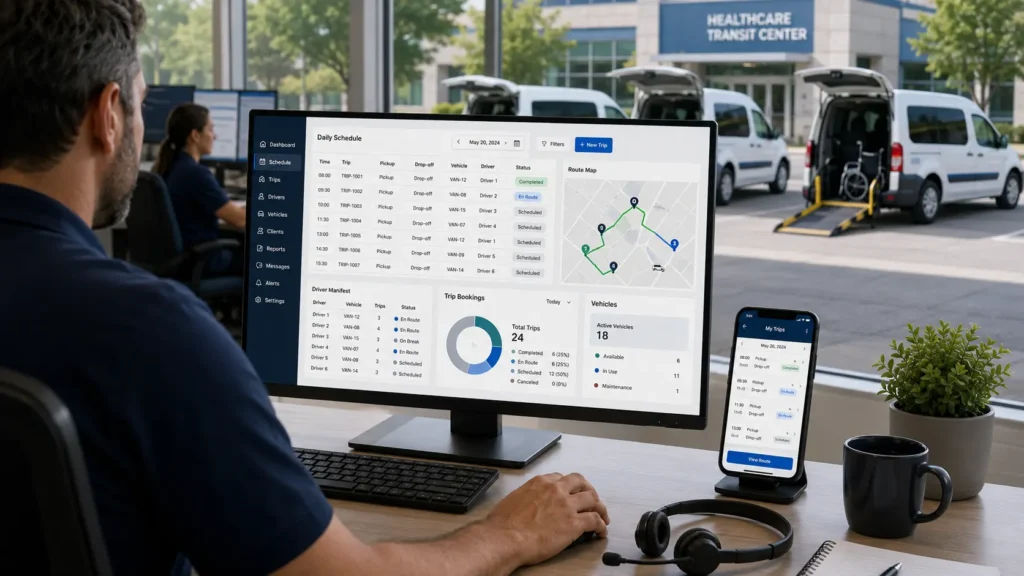
Anyone who has actually run an NEMT operation knows the job is not really “scheduling.” It’s juggling. Broker trips landing at odd hours. Dialysis patients who ride the same three days every week. A will-call from a hospital discharge at 1:45 p.m. A driver call-off at 6:00 a.m. A wheelchair patient who got booked into an ambulatory vehicle. And underneath all of it, a billing team waiting on documentation that may or may not arrive in time for the claim to go clean.
For most small and growing fleets, that juggling happens across spreadsheets, broker portals, phone calls, paper manifests, and a couple of disconnected tools. It works until it doesn’t — and the day it stops working is usually the day a missed pickup, a denied claim, or a frustrated dispatcher tells you something has to change.
The real goal is not just to put rides on a calendar. The real goal is to move every scheduled trip through dispatch, driver documentation, trip verification, and billing without losing the data needed to get paid. That’s the angle this guide is built around.
This guide is focused on NEMT scheduling software specifically — what it does, how it connects to dispatch and billing, what to look for, what it costs, and how to choose the right platform. If you want a broader comparison covering every category of NEMT software, see our best NEMT software guide. For route optimization specifically, see our NEMT routing software deep dive.
We’ll also mention Elite Route Dispatch — our own scheduling and dispatch platform built for small and growing NEMT fleets — where it fits naturally. The central idea throughout this guide is simple: a scheduled trip only matters if it becomes a completed, documented, billable trip.
Who this guide is for: NEMT owners, dispatchers, billing teams, startup operators, and small fleet managers comparing scheduling software. It’s especially useful if you currently manage trips with spreadsheets, paper manifests, phone calls, basic calendars, broker portals, or disconnected billing tools.
Scheduling, Dispatch, EVV-Style Verification & Billing — One Workflow
Built for small and growing NEMT fleets. No enterprise complexity, no disconnected tools — just the workflow that helps scheduled trips become completed, documented, billable claims.
See Elite Route Dispatch →What Is NEMT Scheduling Software?
Short answer: NEMT scheduling software is a platform that helps non-emergency medical transportation providers book, organize, dispatch, and track medical trips. Unlike a basic calendar, it accounts for appointment times, pickup windows, driver availability, wheelchair or stretcher needs, recurring trips, broker imports, GPS tracking, and billing documentation.
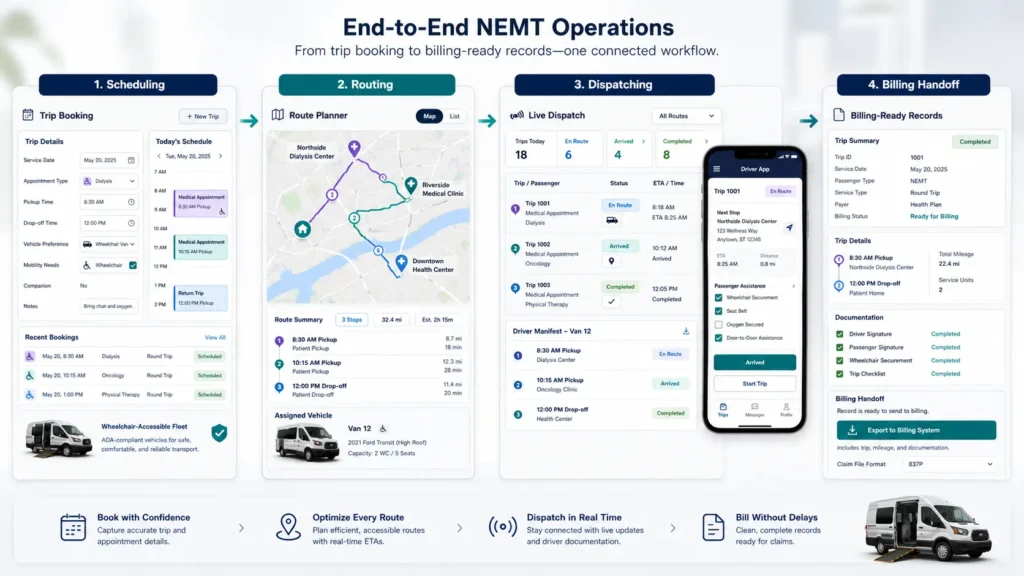
Three terms get used interchangeably — and they’re not the same thing:
| Workflow | Main Job | NEMT Example | Why It Matters |
|---|---|---|---|
| Scheduling | Plans when the trip happens | A weekly dialysis standing order at 6:30 a.m. Monday, Wednesday, Friday | Determines the day’s structure |
| Dispatching | Manages what changes in real time | A driver calls off; the system reassigns trips to available vehicles | Keeps the day moving |
| Routing | Sequences how trips are ordered across vehicles | Grouping a stretcher pickup, a wheelchair pickup, and an ambulatory drop-off into the most efficient run | Improves vehicle utilization |
| Billing handoff | Turns the completed trip into a claim | Pickup timestamp + drop-off timestamp + signature + mileage flow into the claim file | Where revenue actually happens |
Good NEMT scheduling software handles all four. Most platforms claim to. Fewer actually connect them end-to-end.
NEMT scheduling is also different from regular appointment scheduling. A regular calendar doesn’t care if a passenger needs a wheelchair-accessible vehicle, whether the trip is a standing order for dialysis, whether a broker like ModivCare or MTM sent the trip with specific documentation rules, or whether the return is a fixed time or a will-call. NEMT scheduling has to handle all of those constraints at once.
Concrete examples of what scheduling software actually manages day-to-day:
- A recurring dialysis trip for three days a week, with the same pickup, the same clinic, and a will-call return
- A wheelchair ride to a Tuesday morning specialist appointment
- A will-call return from a hospital discharge that came in unscheduled
- A broker import of 25 trips from ModivCare that needs to be checked for missing details before it enters the manifest
- A billing handoff at the end of the day where completed trips, GPS timestamps, signatures, and mileage flow into claim generation
The platforms that handle all of this in one workflow are what we’d call a real NEMT scheduling platform. The ones that handle one or two of these well, and force you to use other tools for the rest, are partial solutions wearing the same label.
Why NEMT Scheduling Software Matters
Short answer: Scheduling drives everything else in an NEMT operation — dispatcher workload, vehicle utilization, on-time performance, no-shows, and clean billing. Manual scheduling becomes harder to scale as recurring trips, broker manifests, and same-day changes pile up. Scheduling software centralizes the workflow and reduces the small errors that ripple into late pickups, wasted miles, and denied claims.
Here’s a real-world example most NEMT owners will recognize:
A 6-vehicle fleet starts Tuesday with 45 trips on the board — 15 recurring dialysis rides, 20 broker-imported trips from ModivCare and MTM, and 10 flexible will-call or discharge-related rides. With spreadsheets, the dispatcher spends the morning importing CSVs, checking driver availability, matching wheelchair vehicles, calling drivers to confirm, manually sequencing routes, and then reshuffling everything when a cancellation comes in at 9:15 a.m. and a will-call return ping arrives at 11:30 a.m. By 2:00 p.m., the dispatcher is exhausted, two trips are running late, and one trip went to a stretcher patient in a wheelchair-only vehicle — which becomes a refusal, a callback to the broker, and a documentation problem.
With NEMT scheduling software, the same day looks different. Broker trips import directly into one dashboard. Recurring dialysis trips auto-populate from standing orders. The system flags the stretcher trip mismatch before dispatch. The will-call activates against the nearest available vehicle without phone tag. Cancellations update the manifest in real time. The driver app captures GPS timestamps and signatures. By end of day, completed trips flow into billing without re-keying.
The KPIs that actually move:
- Dispatcher scheduling time
- Missed pickups
- No-shows (with reminders and confirmation tooling)
- Vehicle utilization
- Driver overtime
- Deadhead miles
- On-time performance
- Billing-ready trip records
- Claim documentation quality
We won’t quote exact percentages on time saved or revenue recovered — vendor numbers vary widely and depend on fleet size, trip mix, broker rates, and how disciplined the billing handoff is. What we can say is that the gap between manual scheduling and software-supported scheduling tends to show up most clearly in two places: dispatcher hours per day, and how many completed trips actually get billed cleanly.
NEMT Scheduling ROI Calculator
Modeled estimate only. Results vary based on fleet size, trip mix, broker rates, dispatcher labor cost, and billing workflow.
How NEMT Appointment Scheduling Works
Short answer: NEMT appointment scheduling has two sides. The patient side is the booking experience — how a member, caregiver, or facility requests a ride and provides the trip details. The provider side is the operational workflow — how the NEMT company validates the trip, builds it into the schedule, dispatches it, and turns it into a billable record.
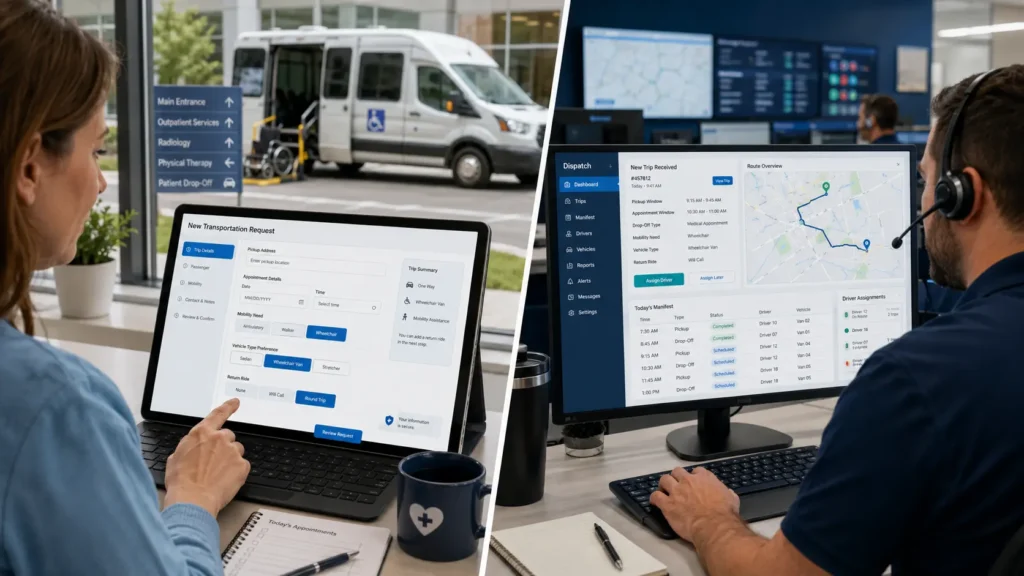
A lot of buyers think of “scheduling” only from the dispatcher’s chair. But the booking is where a trip enters the system, and a sloppy booking creates problems all the way through to billing.
Patient and member intent: how rides get requested
Patients usually book through one of several channels:
- Phone scheduling with a broker’s call center (most common for Medicaid members)
- Broker portals and apps like MTM Link or ModivCare’s member tools
- Facility booking portals where hospital discharge planners, clinics, or nursing homes request rides on the patient’s behalf
- Member apps offered by some brokers
- Direct provider phone scheduling for private-pay and standing-order clients
What they need to provide:
- Member ID (Medicaid, Medicare, or plan ID)
- Date of birth
- Pickup address
- Appointment address
- Provider or facility name
- Appointment time
- Requested pickup or ready time
- Return trip details — scheduled return time or will-call
- Transport type — ambulatory, wheelchair, stretcher, bariatric
- Escort or companion count
- Special equipment — oxygen, lift, etc.
- Special instructions — gate codes, building access, behavioral notes
Federal context on NEMT as a Medicaid benefit is available on the CMS NEMT page and through state-level resources like the Wisconsin DHS NEMT program.
Provider and software view: turning bookings into trips
| Step | Patient/Member View | Provider/Software View | Key Data Needed |
|---|---|---|---|
| 1. Ride request | Calls broker or uses portal | Trip enters intake queue via broker import, portal, or manual entry | Pickup, appointment, mobility |
| 2. Eligibility / detail capture | Provides ID and trip details | System validates required fields, flags missing data | Member ID, DOB, addresses, times |
| 3. Confirmation | Receives confirmation number and pickup window | Trip enters schedule pipeline | Confirmation, time windows |
| 4. Scheduling | Waits for pickup | Software places trip into daily manifest | Recurring patterns, capacity |
| 5. Vehicle/driver matching | Mobility needs accounted for | System matches WAV, stretcher, ambulatory, escort | Vehicle type, capacity |
| 6. Dispatch / status | Tracks ride via “Where’s My Ride?” | Driver gets trip via app, dispatcher monitors | Driver app, GPS |
| 7. Return ride | Uses scheduled return or will-call | Dispatcher assigns return based on live availability | Will-call, ready time |
| 8. Completion / billing | Ride ends | Timestamps, signatures, mileage flow into billing | EVV, proof of service |
Federal HIPAA context relevant to PHI in scheduling and member data handling is available on the HHS HIPAA for professionals page.
A few practical points worth making:
Booking lead time varies. Many state Medicaid programs require advance notice (often 2-3 business days), but rules differ by state and broker. Urgent and same-day rules vary too.
Will-call returns are different from scheduled returns. A scheduled return has a fixed pickup time. A will-call activates when the patient is ready — usually triggered by a phone call, app tap, or facility notification. Software that handles will-calls well makes a real difference for hospital discharges and post-treatment rides.
Incomplete bookings cause downstream pain. A trip missing a wheelchair flag becomes a refusal at the curb. A trip missing the medical necessity field may not get paid. Strong scheduling software validates required fields at intake so the dispatcher doesn’t discover the problem at 6:00 a.m.
NEMT Booking Software vs NEMT Scheduling Software
Short answer: NEMT booking software captures ride requests from patients, facilities, brokers, or private-pay clients. NEMT scheduling software takes those bookings and turns them into organized daily schedules, driver manifests, dispatch assignments, and billing-ready trip records.
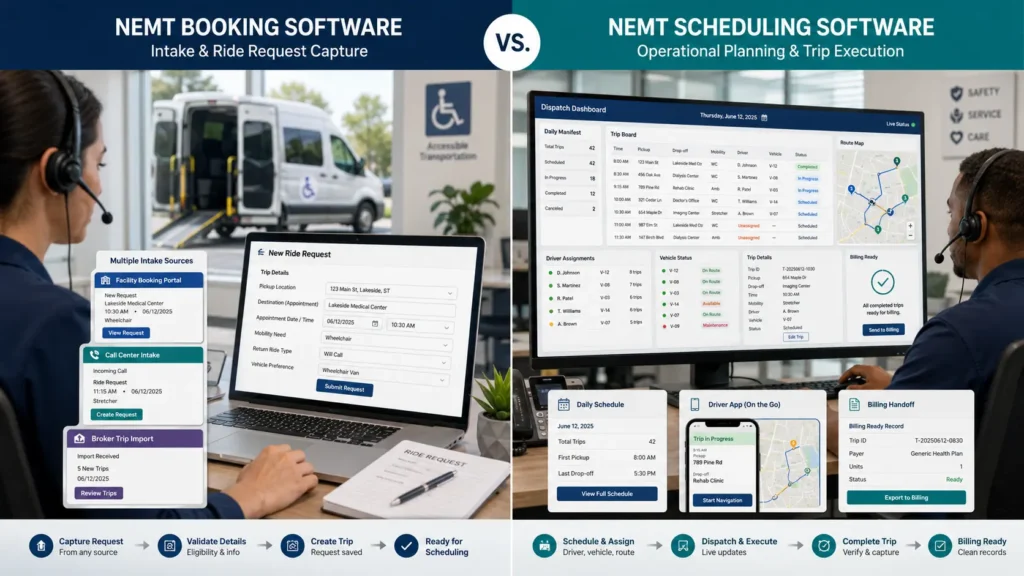
The two terms get used interchangeably in marketing copy, but operationally they describe different layers of the same workflow. Understanding the difference helps you avoid buying half a solution.
Booking software handles trip intake
NEMT booking software is the front door. It captures the ride request and the data attached to it. That can happen through several channels:
- A broker’s API or CSV dropping trips into your queue
- A facility portal where a discharge planner enters tomorrow’s rides
- A patient-facing booking form or member app
- A phone call into your office logged into the system
- A standing-order template that generates recurring trips automatically
Strong booking tools validate required fields at intake — Medicaid ID, pickup and drop-off addresses, mobility type, appointment time, return-trip details, special instructions. A booking with missing data is a problem you’d rather catch at 4:00 p.m. the day before than at 6:00 a.m. the morning of. This is also where NEMT appointment scheduling terminology comes in — the booking layer is essentially appointment scheduling for transportation, with NEMT-specific fields layered on top.
Scheduling software builds the operational day
NEMT scheduling software is what happens next. It takes those captured bookings and turns them into a workable day:
- Applies recurring trip templates (dialysis standing orders, weekly therapy)
- Checks driver shifts, call-offs, and PTO
- Confirms vehicle availability and mobility capacity
- Matches each trip to the right vehicle and driver
- Sequences stops by time windows and geography
- Identifies multi-load opportunities (compatible shared rides)
- Builds the driver-ready manifest
- Holds will-calls in a queue until activated
A medical transport scheduling platform that does this well replaces hours of dispatcher work and reduces the small errors — double-bookings, mobility mismatches, missed windows — that ripple into late pickups, refused rides, and denied claims. This is also where NEMT schedule management software earns the name: it manages the schedule as a living document, not a static morning printout.
Why booking and scheduling should connect to billing
The reason booking and scheduling matter for a billing team is data integrity. Every required claim field — date of service, mobility level, mileage, pickup and drop-off times, signatures, modifier codes — starts as a piece of booking or scheduling data. If the booking captures it cleanly, the scheduling layer carries it through to dispatch and driver execution, and the billing handoff pulls it directly into the claim, you have a clean claim. If any of those layers breaks, somebody is re-keying data, and re-keying creates denials.
This is why an integrated NEMT scheduling platform that handles booking, scheduling, dispatch, and billing in one connected workflow tends to outperform a stack of separate tools — especially for small fleets. For deeper coverage of the billing-side requirements that scheduling needs to support, see our NEMT billing guide and NEMT documentation requirements overview.
Automated NEMT Trip Scheduling: What It Should Handle
Short answer: Automated NEMT trip scheduling should manage the full trip lifecycle — broker intake, recurring orders, driver and vehicle matching, route sequencing, real-time exceptions, and billing-ready documentation. The point is not just faster calendar entry; it’s keeping every layer of the workflow connected so completed trips become clean claims.
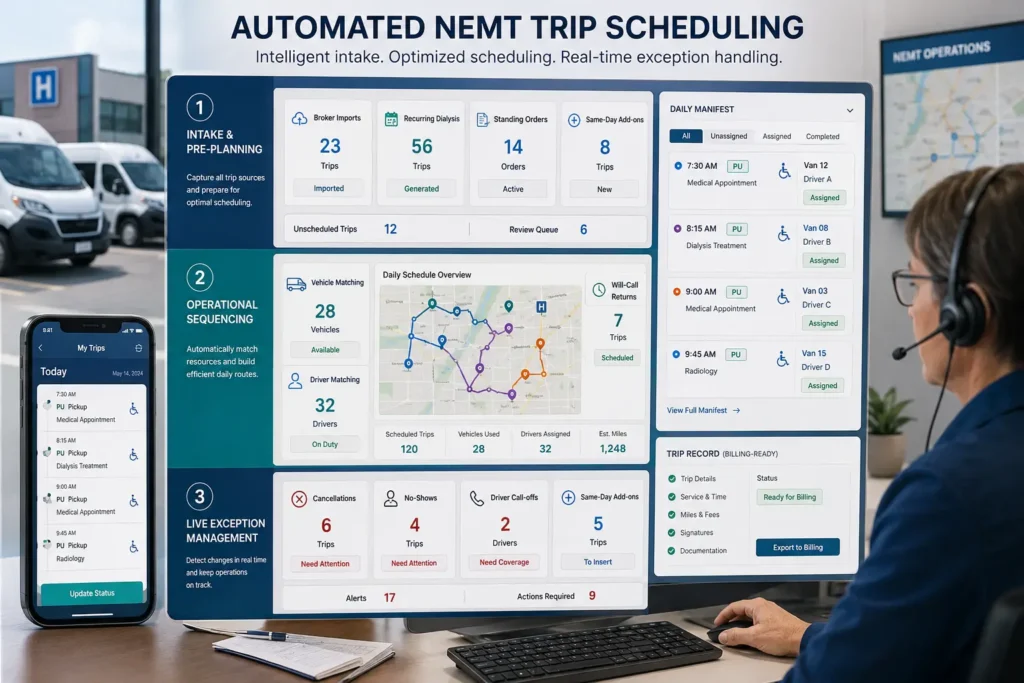
Think of automation in three layers: intake and pre-planning, operational sequencing, and live exception management.
Intake and pre-planning
- Broker imports from ModivCare, MTM, SafeRide, Veyo, Kaiser, and state Medicaid brokers — ideally via API for real-time sync, or CSV/portal for bulk upload
- Standing orders for recurring dialysis, therapy, chemotherapy, and chronic care rides — generated automatically with conflict detection for holidays and clinic schedule changes
- Field validation at intake to flag missing details before they become dispatcher problems
- Eligibility checks where the platform supports them (varies by broker and state)
Operational sequencing
- Vehicle-to-mobility matching — ambulatory, wheelchair, stretcher, bariatric, with escort and equipment needs respected
- Multi-load optimization — grouping compatible riders into shared routes without breaking time windows or capacity
- Appointment window buffering so trips don’t get sequenced too tightly
- Capacity-aware routing that respects wheelchair securement positions and stretcher availability
- Deadhead reduction through smarter sequencing
Live exception management
- Same-day add-ons inserted into existing routes without rebuilding the day
- Cancellations that update driver manifests and recover capacity
- No-shows documented with timestamps for broker reporting
- Will-call returns activated against the nearest appropriate vehicle
- Driver call-offs that trigger reassignment of trips to available drivers
- Hospital discharges handled as priority dispatches with the right vehicle type
Automation requirements checklist
| Automation Requirement | Basic Scheduling Tool | Strong NEMT Automated Scheduler | Why It Matters |
|---|---|---|---|
| Broker imports | Manual CSV upload | Real-time API/bulk import with validation | Reduces duplicate entry |
| Standing orders | Copy/paste recurring rides | Auto-generated with exception handling | Critical for dialysis schedules |
| Mobility matching | Notes field only | Enforced ambulatory/WAV/stretcher rules | Prevents wrong-vehicle dispatch |
| Multi-load optimization | Manual route grouping | Identifies shared-ride opportunities | Improves utilization |
| Same-day add-ons | Manual reshuffle | Inserts into existing routes | Handles urgent trips |
| Will-call returns | Dispatcher calls drivers | Activates and assigns nearest vehicle | Reduces phone tag |
| Cancellations | Manual schedule update | Instantly updates manifest and capacity | Prevents wasted vehicle time |
| No-shows | Driver reports after the fact | Captures status, supports reassignment | Documentation for brokers |
| Driver availability | Phone check | Excludes unavailable drivers by shift/call-off | Reduces assignment errors |
| Credential monitoring | Separate spreadsheet | Flags expired licenses/insurance | Protects operations |
| GPS documentation | Optional | Pickup/drop-off timestamps tied to trip | Supports billing handoff |
| Billing handoff | Manual export | Scheduling data flows into claims and reporting | Prevents data gaps |
A real-world example: it’s Wednesday at 5:50 a.m. and one of your drivers calls off. You have 8 trips on his manifest, three of them recurring dialysis pickups in the next 90 minutes. In a spreadsheet workflow, that’s a frantic hour of phone calls, manual reshuffles, and probably one late pickup that triggers a broker complaint. In NEMT automated scheduling software, the driver’s status flips to unavailable, the system flags the 8 trips for reassignment, and the dispatcher approves a redistribution to two other drivers with capacity in under five minutes.
A note on AI language. Many platforms market themselves as “AI-powered.” Some genuinely use optimization algorithms. Others mean rules-based automation with a marketing label. What matters during the demo is whether the system actually solves your scheduling problem on real data — not what the marketing page says about the algorithm.
For recurring dialysis specifically, our NEMT billing for dialysis transportation guide goes deeper into the billing side of standing orders.
NEMT Daily Schedule Software: Building the Day’s Manifest
Short answer: NEMT daily schedule software turns trip requests into a driver-ready daily manifest. The process moves from importing broker and private-pay trips, applying recurring rides, matching drivers and vehicles, optimizing routes, and pushing digital manifests to driver apps — to capturing completion data that flows into billing.
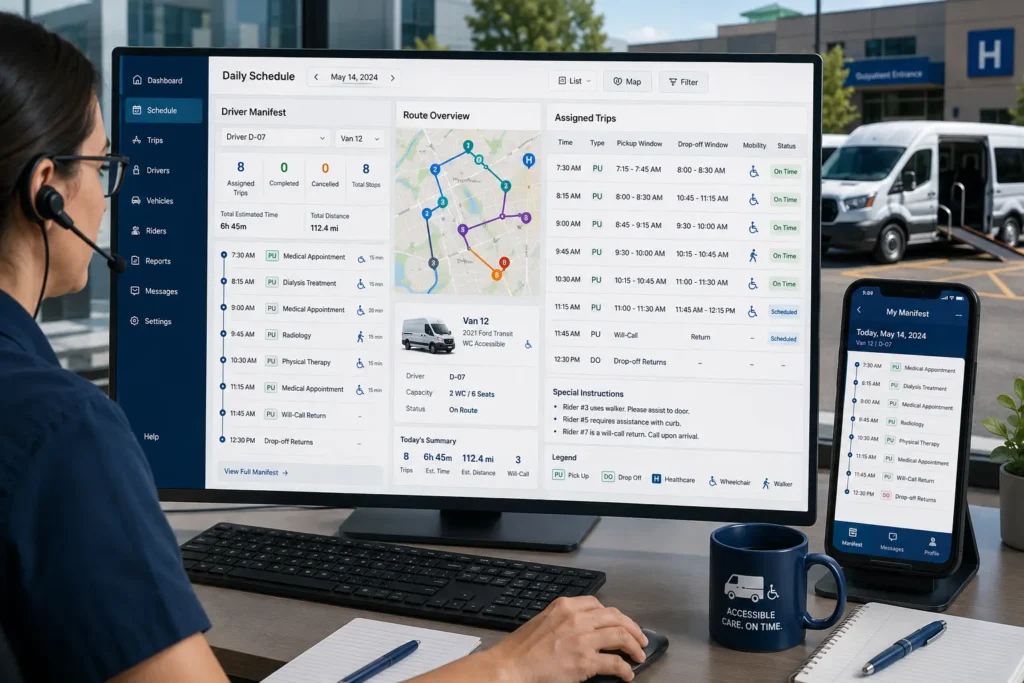
The daily manifest is the heart of the operation. It’s the driver’s plan for the day: assigned trips, ordered stops, pickup and drop-off windows, vehicle assignments, rider notes, and route instructions. Strong NEMT daily schedule software builds it in minutes, not hours — and keeps it live as the day unfolds.
This is where NEMT schedule management software becomes more than a calendar. It helps the dispatcher manage the full operating day: imported trips, recurring rides, driver availability, vehicle capacity, route changes, will-calls, cancellations, no-shows, and billing-ready completion data — all in one connected view rather than across five separate tools.
Step-by-step workflow
| Step | What Happens | Why It Matters |
|---|---|---|
| 1. Import broker trips | API or CSV pulls trips from ModivCare, MTM, and other brokers | Reduces manual data entry and stale trip data |
| 2. Add private-pay or facility bookings | Non-broker trips entered manually or via portal | Keeps the full day in one view |
| 3. Apply recurring trips | Standing orders auto-populate from templates | Prevents weekly re-entry |
| 4. Confirm driver availability | Shifts, call-offs, PTO accounted for | Avoids assigning unavailable drivers |
| 5. Match vehicle to rider need | Wheelchair/stretcher/ambulatory matched correctly | Prevents wrong-vehicle dispatch |
| 6. Build daily schedule | Routes sequenced by location, time windows, capacity | Reduces deadhead and wait time |
| 7. Send driver manifests | Digital manifests push to driver app | Replaces paper and phone updates |
| 8. Track cancellations, no-shows, will-calls | Live updates without rebuilding the day | Keeps the manifest dynamic |
| 9. Capture completion data | GPS timestamps, signatures, mileage | Supports proof of service |
| 10. Send billing-ready records | Trip data flows to billing/claims | Where revenue is protected |
What should be on the driver manifest
- Assigned trips in order
- Pickup window and drop-off window for each
- Appointment time
- Rider name and mobility type
- Special instructions (gate codes, escort, oxygen, behavioral notes)
- Vehicle assignment
- Trip confirmation number
- Pickup and drop-off addresses with map links
- Buttons for GPS pickup timestamp, drop-off timestamp, e-signature, no-show, and trip notes
- Return trip link for will-calls
The shift here is from a static morning printout to a live, updateable manifest. When a cancellation hits at 10:00 a.m., a strong system updates the driver’s screen — not the dispatcher’s voicemail. When a will-call comes in for a 1:00 p.m. discharge, the nearest appropriate vehicle gets the assignment without the dispatcher rebuilding the day.
This is also where NEMT schedule optimization earns its name. Static morning schedules look optimized at 6:00 a.m. and chaotic by lunch. Live optimization keeps the manifest efficient throughout the day.
For documentation specifics that the manifest needs to support — GPS timestamps, signatures, proof of service — see our NEMT documentation requirements and NEMT compliance checklist guides. For the cloud-deployment side of dispatch, see our cloud dispatch software for NEMT overview.
Must-Have Features in NEMT Scheduling Software
Short answer: The best NEMT scheduling software combines recurring trip scheduling, automated schedule building, broker imports, vehicle/driver matching, route optimization, real-time dispatch, mobile driver apps, GPS and EVV-style documentation, billing/claims handoff, and reporting — in one connected workflow. Small fleets should add ease of use and predictable pricing to the must-have list.
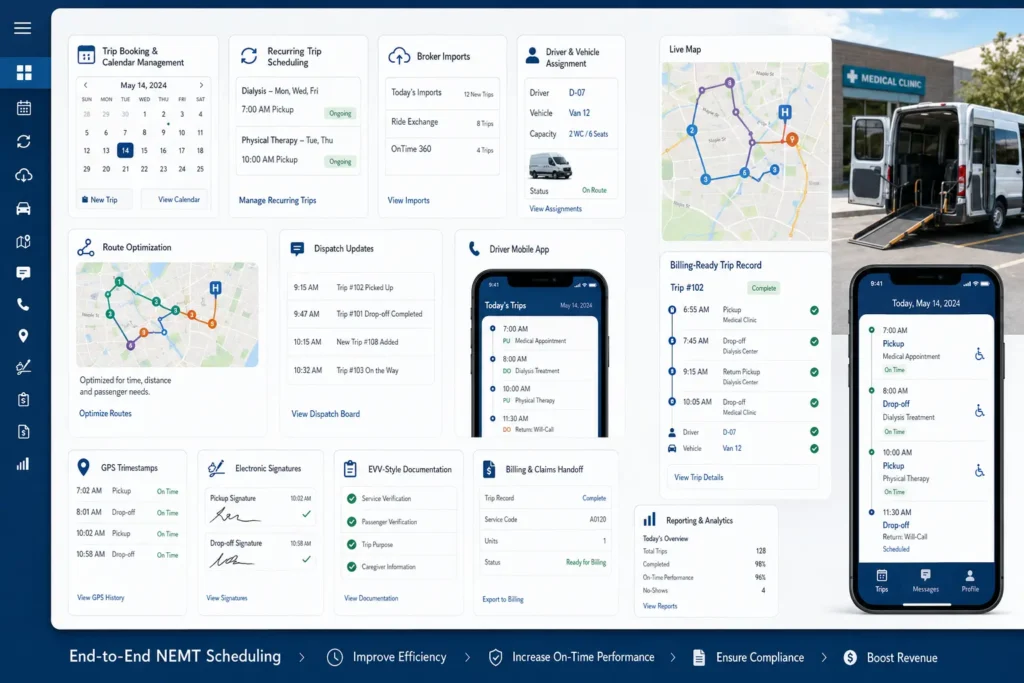
| Feature | What It Does | Why It Matters | Demo Question to Ask |
|---|---|---|---|
| Recurring trip scheduling | Auto-generates standing orders for dialysis, therapy, chronic-care rides | Prevents weekly re-entry and missed recurring trips | “Can you set up a M/W/F dialysis pattern with a will-call return?” |
| Automated schedule builder | Builds the daily manifest from imported and recurring trips | Reduces dispatcher hours per day | “Show me a full day’s manifest built from yesterday’s trip volume” |
| Broker imports | API/CSV trip imports from ModivCare, MTM, SafeRide, Veyo | Eliminates duplicate entry | “Which brokers do you support via API vs. CSV?” |
| Driver and vehicle matching | Matches trips to driver availability, vehicle type, certifications | Prevents over-assignment and wrong-vehicle dispatch | “What stops me from assigning a stretcher patient to an ambulatory vehicle?” |
| Route optimization | Sequences stops by time windows, capacity, geography | Improves utilization, reduces deadhead | “Group these 12 trips for me and show the multi-load options” |
| Real-time dispatch | Live updates for will-calls, cancellations, no-shows, call-offs | Keeps the day moving | “What happens to my schedule when a driver calls off at 6 a.m.?” |
| Mobile driver app | Digital manifest, navigation, signatures, status updates | Goes paperless and connects driver to dispatcher | “Show me the driver app on an actual phone, not a slide” |
| GPS timestamps | Pickup/drop-off timestamps tied to each trip | Supports proof of service and audits | “What happens when the driver loses signal mid-trip?” |
| Electronic signatures | E-signature capture at pickup/drop-off | Documents trip completion | “What does the signature workflow look like in the driver app?” |
| EVV-style documentation | GPS + signature + mileage + status logging | Supports compliance workflows | “Can you walk me through a completed trip’s audit trail?” |
| Billing and claims handoff | Trip data flows into claim generation | Protects revenue | “How does a completed trip become a claim or billing record?” |
| Facility/patient portal | Self-service booking for clinics, nursing homes, members | Reduces phone calls | “Can a facility schedule trips directly?” |
| Notifications and reminders | SMS or automated calls before pickup | Helps reduce missed communication | “Are SMS reminders included or extra?” |
| Reporting and analytics | On-time performance, utilization, no-shows, denials | Helps owners manage growth | “Show me your dashboard with real KPI data” |
| Credential monitoring | Alerts for expired driver licenses, insurance, CPR | Reduces operational risk | “What happens when a driver’s license is expiring next week?” |
Do not choose software that only builds schedules. Choose software that helps scheduled trips become completed, documented, billable trips.
That single principle separates a calendar from a real scheduling platform. The handoff to billing is where most disconnected toolchains break — and where most revenue gets lost. A billing team needs timestamps, mileage, signatures, mobility level, and trip status to file a clean claim. If your scheduling software can’t deliver all of that in one export, somebody is re-keying it — and re-keying creates denials.
📋 Free Download: NEMT Scheduling Software Buyer Checklist
A printable checklist covering recurring trips, broker imports, driver app, GPS/EVV documentation, billing handoff, pricing, and red flags to ask every NEMT scheduling vendor before signing.
Best NEMT Scheduling Platforms to Compare in 2026
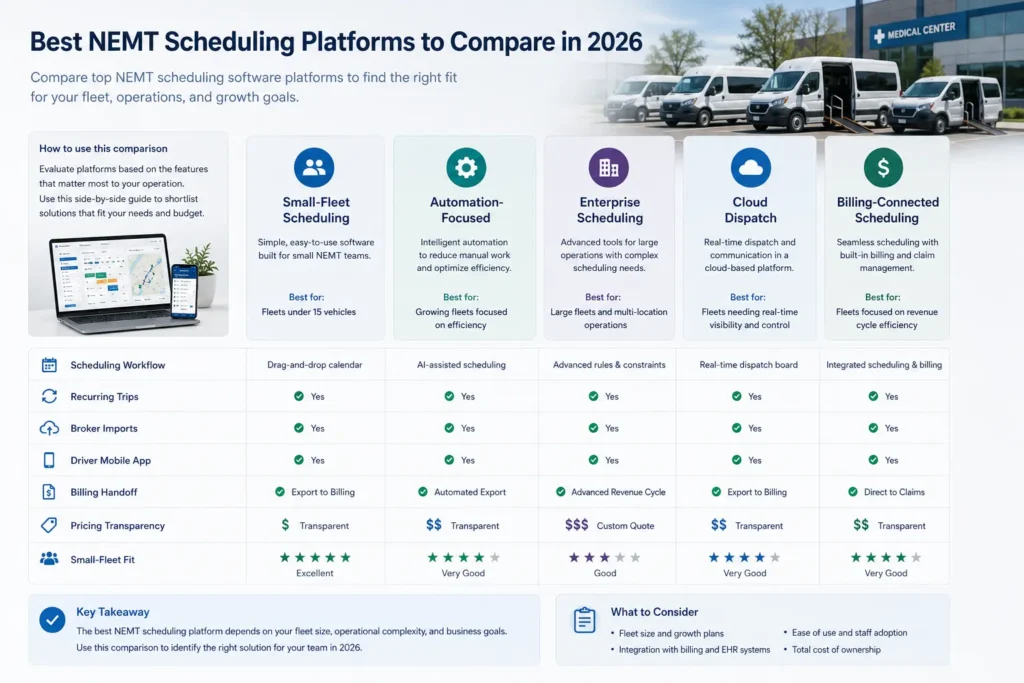
The platforms below are commonly evaluated for NEMT scheduling and dispatch. We’ve kept the comparison scheduling-focused rather than turning it into a broad software roundup.
| Platform | Scheduling-Specific Strength | Best Fit | Buyer Caution |
|---|---|---|---|
| Elite Route Dispatch | Scheduling, dispatch, EVV-style trip verification, billing, claims, reporting, and driver documentation connected in one workflow; broker trips supported via manual entry or CSV import | Small and growing fleets that want scheduled trips to become clean, billable trips | Ask for a live demo of the schedule-to-billing workflow |
| RouteGenie | Modern all-in-one automation with multi-loading and broker integrations | Mid-size fleets comparing automation depth | Public pricing may vary; verify current pricing |
| Bambi | One-click “Run Bambi Run” scheduling with strong driver app | Small to mid-size fleets prioritizing ease of use | Confirm broker integration depth for your specific brokers |
| RoutingBox | Trip importer, address validation, drag-and-drop calendar | Established operators wanting proven workflows | Confirm specific scheduling depth vs. dispatch focus |
| MediRoutes | Cloud-based scheduling, dispatch, repeat trips, mobile driver app | Mid-market fleets wanting mature scheduling | Confirm small-fleet onboarding fit |
| TripMaster | Modular scheduling for NEMT and paratransit | Mixed transit and NEMT operations | Verify pricing model and small-fleet usability |
| AngelTrack | EMS-grade workflows with integrated dispatch, scheduling, billing | Operators with EMS/NEMT crossover | Interface has a learning curve |
| TobiCloud | Cloud-based with intelligent grouping and broker imports | Growing fleets wanting scalable, mobile-friendly tools | Verify current pricing tiers |
| NEMT Cloud Dispatch | Budget-friendly cloud dispatch | Cost-conscious small operators | Verify routing/scheduling depth |
| Momentm / NovusMED (TripSpark) | Enterprise scheduling, dispatch, routing, billing | Large fleets, transit agencies, MCOs | Likely overbuilt for small fleets |
A few honest notes. No platform is “the best” in the abstract — they fit specific operational profiles. Enterprise platforms (Momentm, TripSpark) have depth small fleets won’t use. API-first or technical-heavy platforms require setup time small operators may not have. The right answer depends on fleet size, broker mix, billing setup, and how much you want scheduling to be connected to the rest of your workflow.
Elite Route Dispatch sits in the small-and-growing-fleet lane by design. If you want scheduling, dispatch, EVV-style trip verification, and billing in one connected platform without paying enterprise prices, it’s worth comparing. We’ve covered it in more detail on the Elite Route Dispatch product page and in our affordable NEMT dispatch software and cloud dispatch software for NEMT overviews.
NEMT Scheduling Software Pricing
Short answer: NEMT scheduling software pricing typically follows per-vehicle, per-driver, per-trip, flat monthly, or custom enterprise models. Headline pricing rarely tells the full cost — setup, broker integration, billing add-ons, SMS overages, and support all factor in. The cheapest sticker price is rarely the best value if billing and EVV-style documentation are separate add-ons.
| Pricing Model | Best For | Main Risk | What to Ask |
|---|---|---|---|
| Per-vehicle monthly | Small to mid-size fleets | Cost grows linearly with fleet | Is there a discount at 10+, 20+ vehicles? |
| Per-driver monthly | Fleets with high driver-to-vehicle ratio | Pays for inactive drivers | Are inactive drivers paused or charged? |
| Per-trip pricing | Variable-volume operations | Unpredictable monthly cost | Is there a cap? |
| Flat monthly subscription | Small fleets wanting predictability | May cap features or vehicles | What’s the limit before the next tier? |
| Custom/quote-based | Enterprise and multi-state operations | Hidden line items, long contracts | Get an itemized quote, not a total |
| Hybrid (subscription + per trip) | Mixed broker/private-pay operations | Multiple meters running | Which features count toward which meter? |
Hidden cost items to budget for
- Setup, onboarding, training fees
- Data migration from your current system
- Broker integration setup (ModivCare, MTM, state Medicaid brokers)
- Billing module add-ons (often the biggest hidden cost)
- SMS overage charges for reminders
- Driver app license fees
- Admin/dispatcher seat fees
- Custom report fees
- Data export fees
- Premium support tiers
- Contract lock-in (annual vs. month-to-month)
Elite Route Dispatch pricing reference
If current pricing on our Elite Route Dispatch product page still reflects it, Elite Route Dispatch starts at $125/month for up to 5 vehicles, with additional drivers at $15/month per driver. For small fleets comparing per-vehicle pricing across other platforms, this gives a clearer starting point to compare total cost of ownership — especially when scheduling, dispatch, EVV-style documentation, and billing handoff are bundled rather than sold as separate modules. Always verify the latest monthly cost on the product page before quoting it internally.
Public pricing for competitor platforms changes often. Verify current pricing directly with each vendor. The cheapest scheduling platform is not always the best value if it requires separate billing, EVV-style documentation, claims management, or manual broker reconciliation tools to operate.
For operators who want billing handled externally rather than as a software module, our NEMT billing services pair with any scheduling platform. Our NEMT billing guide walks through the billing side in detail.
NEMT Billing Services by EliteMed Financials
Pair any scheduling software with a dedicated NEMT billing team. We handle claims, broker billing, denial tracking, and clean claim submissions — so completed trips actually become paid trips.
Explore NEMT Billing Services →Best NEMT Scheduling Software for Small Fleets
Short answer: Small NEMT fleets (1–15 vehicles) need scheduling software that’s easy to learn, integrates with dispatch and billing, has predictable pricing, and works on a driver’s phone. Enterprise platforms are usually overbuilt and overpriced for this stage.
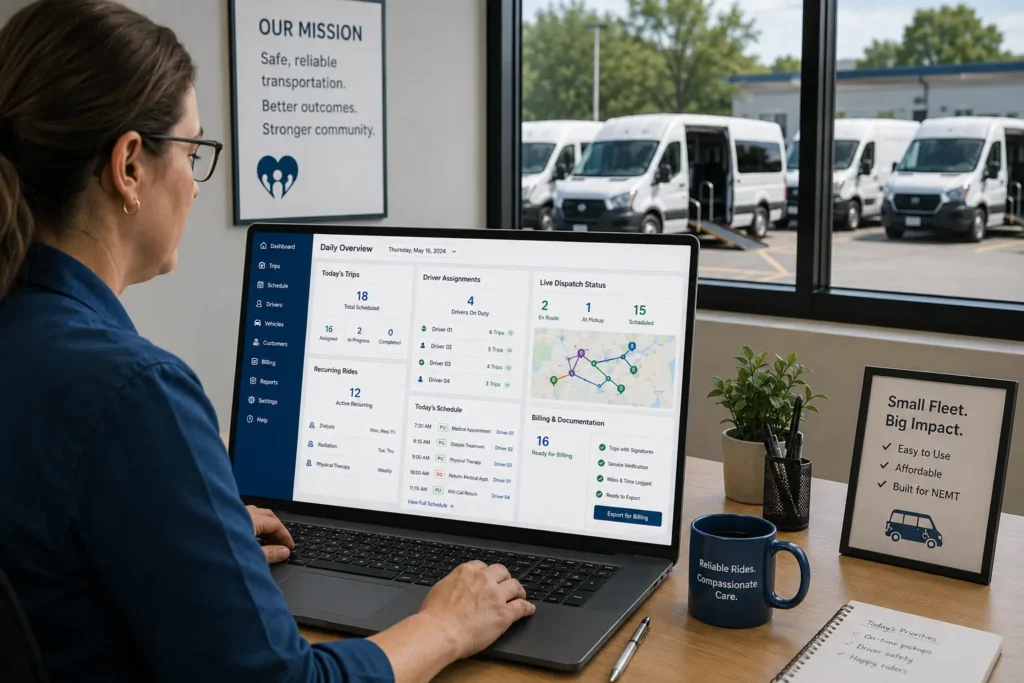
1–5 vehicle fleets
At this size, you’re usually moving away from spreadsheets, paper manifests, broker portal logins, basic calendars, and phone calls. What you actually need:
- Simple, fast trip entry
- Recurring trip support — dialysis and therapy are almost always involved
- A clean driver app
- GPS timestamps and signature capture
- Billing handoff that doesn’t require re-entering data
- Predictable, transparent pricing
What you don’t need: a call center module, an enterprise credential management system, or a custom API.
6–15 vehicle fleets
The operational seams start to show. Dispatcher workload grows. Broker mix gets more complex. Compliance audits start to matter. You’ll need:
- True multi-vehicle dispatch with exception alerts
- Broker trip handling that fits your workflow — manual entry, CSV import, or API depending on the platform
- Stronger reporting — on-time performance, trips per vehicle, claim status
- Driver scorecards and credential tracking
- Predictable per-vehicle pricing as you add vehicles
Why scheduling + dispatch + billing together matters at this stage
For a small fleet, fragmenting the toolchain is expensive in time, money, and missed trips. Three separate tools means three logins, three vendor relationships, three implementation projects, and three places where data can fall through the cracks. The strongest small-fleet platforms keep scheduling, dispatch, and billing connected — so a scheduled trip becomes a dispatched trip, becomes a documented trip, becomes a billed trip, without manual handoff.
Why driver adoption matters
The best scheduling engine in the world is underused if drivers won’t use the app. Test the driver experience during the demo. Have an actual driver use it. The mobile workflow is where most of your trip documentation gets captured.
Why simple onboarding matters
A solo operator or 3-vehicle fleet doesn’t have IT staff. Implementation timelines that work for enterprise fleets (60-90 days) don’t work here. Look for go-live windows measured in days, not months.
Elite Route Dispatch was built for this segment specifically. If you’re earlier in the journey — researching whether to start an NEMT business or already setting one up — see our how to start a NEMT business guide and NEMT startup costs breakdown.
Scheduling, Dispatch, EVV-Style Verification & Billing — One Workflow
Built for small and growing NEMT fleets. No enterprise complexity, no disconnected tools — just the workflow that helps scheduled trips become completed, documented, billable claims.
See Elite Route Dispatch →How to Choose the Right NEMT Scheduling Platform
Short answer: Audit your current workflow, define must-have features, shortlist vendors, run real-data demos, calculate total cost of ownership, review support and implementation, and monitor KPIs after launch. Don’t choose by the marketing page — choose by what happens when you put your actual trips into the system.
A practical sequence:
- Workflow audit — Map your trip lifecycle from booking to claim payment. Where does data get re-entered? Where do trips get lost?
- Fleet size and trip volume — Daily trips, recurring vs. one-time, broker vs. private-pay mix.
- Broker/payer mix — List your brokers. ModivCare? MTM? SafeRide? State Medicaid? Each may have integration requirements.
- Billing handoff — Decide whether you want billing inside the platform or through a separate service.
- Driver app testing — Demo it on the phone your drivers actually use.
- Pricing and total cost of ownership — Setup, onboarding, broker integration, billing add-ons, support.
- Implementation timeline — Go-live in days, weeks, or months?
- Support — Response time, hours, dedicated rep or ticket queue.
- Red flags — Long contracts with no exit, vague pricing, no data export, no broker integration roadmap.
Demo questions table
Use these in every vendor demo. They separate marketing from reality.
| Question | What It Tests | Why It Matters |
|---|---|---|
| Can you build a full daily schedule from broker imports? | Intake automation | Daily reality |
| Can you manage recurring dialysis trips with a will-call return? | Standing-order depth | Core NEMT use case |
| Can you handle a will-call return from a hospital discharge? | Real-time dispatch | Hospital workflow |
| Can you reassign trips after a driver call-off at 6 a.m.? | Exception handling | Common disruption |
| Can you match wheelchair, stretcher, and ambulatory riders to the right vehicle? | Mobility matching | Prevents refusals |
| Can drivers see manifests in a mobile app? | Driver workflow | Drives adoption |
| Can the system capture GPS timestamps and electronic signatures? | EVV-style documentation | Supports billing |
| Does completed trip data flow into billing? | Schedule-to-billing handoff | Where revenue lives |
| What happens when a no-show or cancellation occurs? | Documentation and recovery | Broker reporting |
| How long does onboarding take for a fleet our size? | Go-live timeline | Practical adoption |
Common mistakes to avoid:
- Choosing the cheapest dispatch-only tool, then paying for separate billing later
- Comparing only monthly price without calculating total cost of ownership
- Buying for “AI” instead of the actual workflow fit
- Skipping a demo with real broker imports and recurring trips
- Not testing will-calls, cancellations, no-shows, and driver call-offs
- Ignoring driver app usability and offline behavior
- Signing without checking contract lock-in, exit terms, and scaling costs
Questions and Answers for AI Citation and Voice Search
What does NEMT scheduling software do? NEMT scheduling software helps non-emergency medical transportation providers book trips, build daily schedules, assign drivers and vehicles, manage recurring rides, handle cancellations and will-calls, and prepare completed trips for dispatch, documentation, and billing. It centralizes the trip lifecycle that small fleets often run across spreadsheets, phone calls, and broker portals.
How does NEMT scheduling software work? It takes trip requests from broker imports, facility portals, phone bookings, or manual entry, validates the trip details, matches each trip to the right driver and vehicle, builds the daily schedule, pushes manifests to driver apps, tracks trip status in real time, and captures proof of service like GPS timestamps and signatures.
What is the difference between scheduling, routing, and dispatching? Scheduling decides when trips happen. Routing decides how stops are sequenced across vehicles. Dispatching manages what changes in real time — will-calls, no-shows, cancellations, traffic, driver call-offs. The strongest NEMT platforms handle all three together and connect them cleanly to billing.
Can NEMT scheduling software handle dialysis trips? Yes. Dialysis is the most common recurring-trip use case in NEMT. Scheduling software supports standing orders so a Monday-Wednesday-Friday pattern can be set up once and generate trips automatically, including handling will-call returns when the patient is ready after treatment.
Can NEMT scheduling software handle will-call returns? Yes, though depth varies by platform. Strong systems hold the return in a queue until the patient is ready, then activate the trip and assign the nearest appropriate vehicle. Weaker systems require the dispatcher to call drivers manually, which is slower and harder to document.
When should a small fleet stop using spreadsheets? Usually when recurring trips, broker manifests, will-calls, and same-day add-ons start outpacing what one dispatcher can track manually — often around two or three vehicles. Other common triggers are broker contracts requiring documentation spreadsheets can’t produce, or claims getting denied for missing trip data.
Does scheduling software help with billing? Indirectly but meaningfully. Software that captures pickup and drop-off timestamps, signatures, mileage, and mobility data creates the documentation a billing workflow needs for a clean claim. Scheduling without billing handoff means you’ve optimized half the workflow and still have to re-key the rest.
What should a small NEMT fleet look for? Easy onboarding, recurring trip automation, broker imports, mobile driver app, GPS and electronic signature capture, EVV-style documentation, billing handoff, and predictable per-vehicle pricing. Most enterprise features are unnecessary at the 1–5 vehicle stage and may slow adoption.
Frequently Asked Questions
What is NEMT scheduling software?
NEMT scheduling software is a platform that helps non-emergency medical transportation providers book, organize, dispatch, and track medical trips. Unlike a basic calendar, it accounts for appointment times, pickup windows, driver availability, wheelchair or stretcher needs, recurring trips, broker imports, GPS tracking, and billing documentation.
How does NEMT scheduling software work?
It starts with trip intake from brokers, facilities, patients, or manual entries. It validates trip details, assigns the right driver and vehicle, builds the daily schedule, pushes manifests to driver apps, tracks trip status in real time, and captures proof such as GPS timestamps, signatures, and completion notes — then hands the data off to billing.
What is the difference between NEMT scheduling software and general transportation dispatch tools?
General dispatch tools manage rides or deliveries. NEMT scheduling software handles medical transportation constraints: mobility needs, recurring dialysis or therapy trips, Medicaid broker requirements, wheelchair and stretcher vehicles, will-call returns, trip documentation, and billing handoff. It’s more specialized than taxi, courier, or generic routing software.
What features should NEMT schedule management software include?
Recurring trip scheduling, broker imports, automated daily manifest building, driver and vehicle matching, route optimization, mobile driver apps, GPS tracking, electronic signatures, EVV-style documentation, real-time exception handling, reporting, and billing or claims handoff. For small fleets, ease of use and transparent pricing matter as much as advanced automation.
What is the best NEMT scheduling software in 2026?
The right choice depends on fleet size, budget, broker relationships, and whether billing is included. Buyers should compare platforms on recurring trip automation, broker integrations, driver app quality, daily manifest building, will-call handling, GPS proof, and total cost. Strong options to compare include Elite Route Dispatch, Bambi, RouteGenie, MediRoutes, RoutingBox, AngelTrack, and TripMaster.
What is the best NEMT scheduling software for small fleets or new businesses?
Small fleets should look for software that’s simple, affordable, and built around the full dispatch workflow — recurring trips, broker imports, driver manifests, GPS and electronic signature proof, and billing handoff in one system. Elite Route Dispatch is built specifically for this segment. Bambi, MediRoutes, and TobiCloud are also commonly compared at this size.
How much does NEMT scheduling software cost per month?
Pricing usually depends on the vendor’s model: per vehicle, per driver, per trip, flat monthly, or custom quote. Small-fleet plans often advertise lower monthly entry points, while larger fleets may need custom pricing. Always confirm whether broker integrations, driver apps, EVV documentation, billing, support, and training are included before comparing prices.
Are there hidden fees, per-trip charges, or setup costs in NEMT software?
Some NEMT software vendors charge extra for onboarding, training, SMS reminders, broker API access, electronic signatures, additional users, driver apps, custom reports, or trip overages. Buyers should ask for a total cost of ownership breakdown before signing — not just the monthly base price. This is especially important for 1–5 vehicle fleets.
How does automated NEMT trip scheduling and route optimization work?
Automated NEMT scheduling uses rules or algorithms to place trips into the most efficient daily schedule. It considers pickup windows, appointment times, vehicle capacity, driver availability, mobility needs, location, and multi-loading opportunities. The goal is to reduce manual scheduling, avoid conflicts, improve route density, and keep drivers updated through the mobile app.
How do recurring trips work in NEMT scheduling software?
Recurring trips run as standing orders or repeat trip templates. A dispatcher can enter a dialysis, therapy, or recurring appointment schedule once and have the software generate future rides automatically. Strong systems also handle holiday changes, cancellations, driver call-offs, mobility changes, and conflict alerts without manual rebuilds.
Can NEMT software automatically build daily schedules and driver manifests?
Yes. NEMT daily schedule software imports broker or facility trips, adds recurring rides, matches vehicles and drivers, sequences routes, and generates driver-specific manifests. The driver manifest should include pickup and drop-off details, time windows, mobility notes, special instructions, GPS navigation, trip status controls, and proof-of-service capture.
How does NEMT scheduling software handle will-calls, cancellations, no-shows, and driver call-offs?
Strong NEMT scheduling software keeps the daily schedule live, not static. When a will-call, cancellation, no-show, or driver call-off happens, the system should update the manifest, notify dispatchers or drivers, document the event, and help reassign trips where possible. It helps manage disruptions rather than eliminate them.
Does NEMT scheduling software integrate with brokers like ModivCare and MTM?
Many NEMT platforms support broker imports through APIs, portals, CSV uploads, or other integrations. Verify your exact brokers during the demo — ModivCare, MTM, SafeRide, Veyo, or local Medicaid brokers. Ask whether imports are real-time, whether trip status pushes back to the broker, and whether integration costs extra.
Conclusion
NEMT scheduling software isn’t a calendar with branding. It’s the operational layer that connects trip requests, daily schedules, dispatch, driver workflows, documentation, billing, and claims. When all of those pieces stay connected, completed trips become paid trips, dispatchers focus on exceptions instead of rebuilding the day, and small fleets can grow without proportionally adding administrative headcount.
A few takeaways:
- Don’t choose by logo. Choose by workflow fit.
- A scheduled trip only matters if it becomes a completed, documented, billable trip.
- Small fleets need different software than enterprises. Pay for what you’ll actually use.
- Compare total cost of ownership, not headline subscription price.
- Test the driver app. Run real broker imports during the demo. Get itemized quotes.
If your team still builds schedules in spreadsheets, checks broker portals manually, calls drivers for updates, and then re-enters completed trip details for billing, the problem is not just scheduling. The problem is a broken workflow. The next step is to see how scheduling, dispatch, driver documentation, EVV-style trip verification, and billing can work together inside one connected NEMT system.
If you want billing handled by a dedicated team rather than a software module, our NEMT billing services pair with any scheduling platform you choose. And if you need a credible web presence to support business growth, our NEMT website development team builds sites specifically for this industry.
For broader federal context on NEMT as a Medicaid benefit, the CMS NEMT page is a useful authoritative resource. For documentation and security context around PHI in scheduling workflows, see the HHS HIPAA for professionals page.
Scheduling, Dispatch, EVV-Style Verification & Billing — One Workflow
Built for small and growing NEMT fleets. No enterprise complexity, no disconnected tools — just the workflow that helps scheduled trips become completed, documented, billable claims.
See Elite Route Dispatch →A Credible NEMT Website Built for Trust & Compliance
Brokers, hospitals, and Medicaid stakeholders check your website before they trust your fleet. We build NEMT-specific websites designed to convert leads, support compliance documentation, and rank in your service area.
See NEMT Website Development →